Smart upscaler: what the name covers, how it differs from a plain resize, and how to choose one
A smart upscaler is an AI enlarger that predicts new detail instead of only averaging pixels, and the name belongs to several different products; this site is none of them and does not upscale, but its editor cleans up one photo into a 1024 × 1024 image in about 37 seconds. Free with sign-up: 10 credits = 1 image, then from $0.13 per image on a monthly plan.
 Your photo
Style changes (cartoon, 3D, anime) are not reliable yet. If the result looks unchanged, try again or describe the change more specifically.
One-tap edits
- Not affiliated with any product named Smart Upscaler
- Cleans up photos, does not enlarge them
- Free with sign-up: 10 credits = 1 image
- products or modes with “smart” in the name that we read: Icons8, Let’s Enhance and AI Upscaler
- 3
- existing pixels a bicubic resize reads for each new pixel
- 16
- px, the largest size Icons8 states on its page
- 7680 × 7680
- px, what this site returns (no upscale)
- 1024 × 1024
What is a smart upscaler?
A smart upscaler is a tool that makes a picture bigger with a trained AI model instead of plain arithmetic. Icons8 describes its Smart Upscaler as deep learning, also called super-resolution, trained on over 5 million images. The idea is that the model fills in texture, edges and faces that look right at the larger size. That is a claim about method, not a promise about your photo: the model predicts detail, and a prediction can differ from what the scene really held.
- Plain resize: new pixels come from neighbours (bicubic reads a 4 × 4 block of 16)
- AI upscale: a model predicts new detail from patterns it learned
- Our reading, not sourced: added detail is a guess, so check faces and text
Smart upscaler vs a plain resize: our side by side
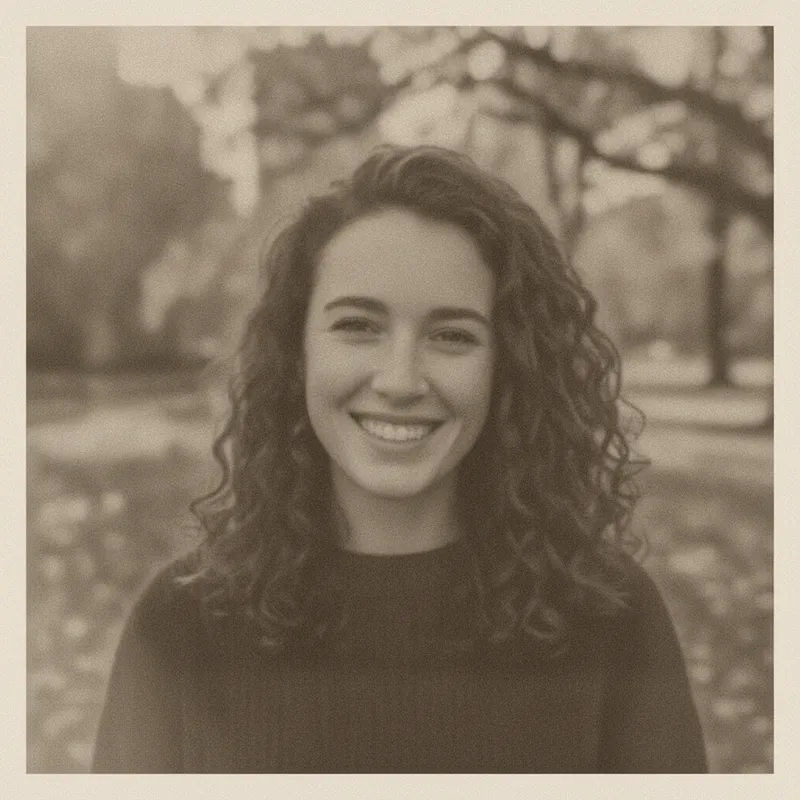
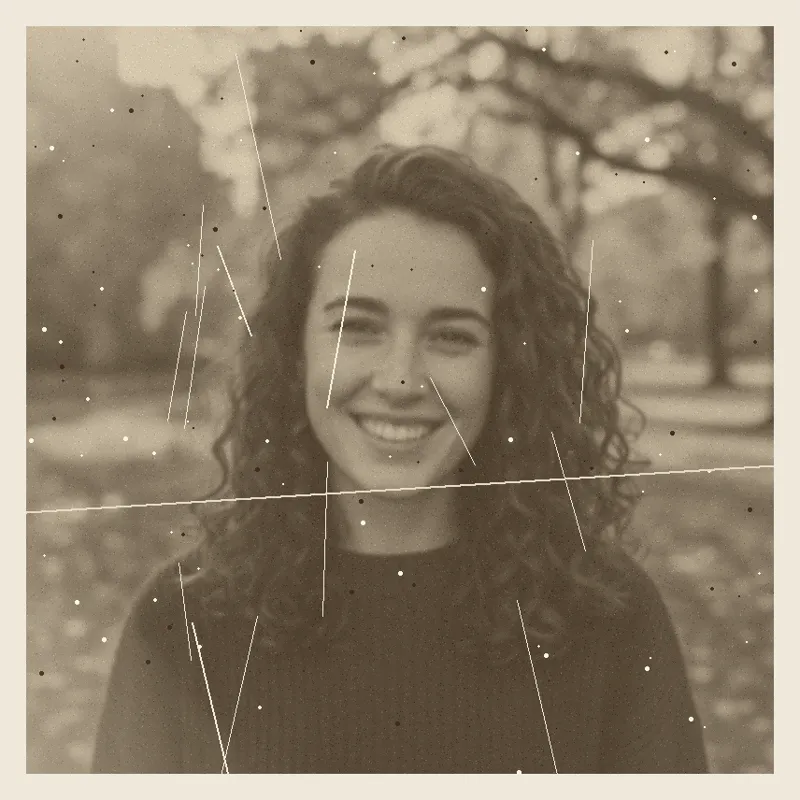
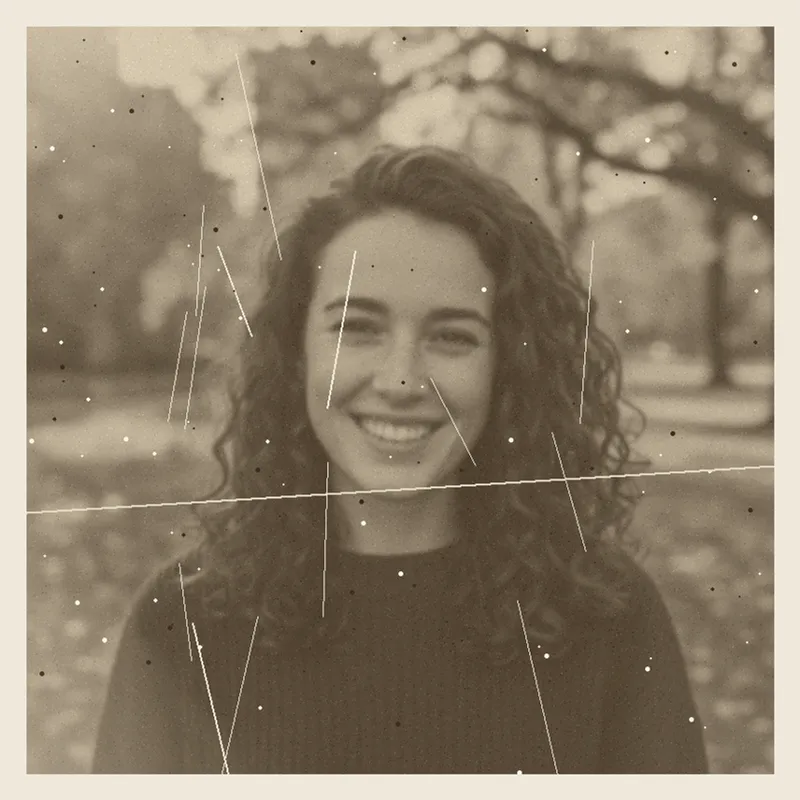
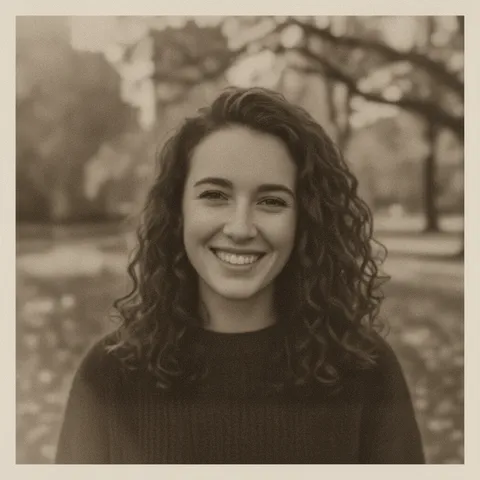
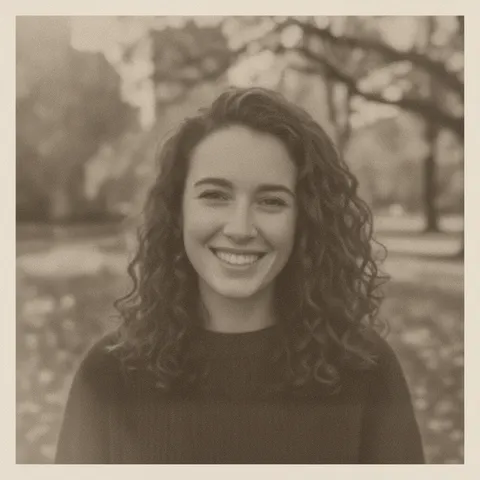
On 2026-11-19 we took this site’s fictional old portrait (800 × 800 px, grainy, scratched, soft) and made two things from it. A plain cubic resize to 1024 × 1024 px, made locally for 0 credits, keeps every scratch and speck and adds nothing new. This site’s editor, given a sharpen-and-clean request, returned a new 1024 × 1024 image: the scratches, dust and much of the grain were gone and the face was still recognisable, but the curls and border were redrawn a little and the background stayed soft because the original was out of focus. It is a clean-up and re-render, not an upscale, and it did not recover real sharpness. One portrait is not a test of every photo.
- Left: input, 800 × 800 px
- Middle: plain cubic resize to 1024 × 1024 px, nothing added
- Right: this site’s clean-up, 1024 × 1024, a new render
Which products are called Smart Upscaler?
More than one. Icons8 sells an AI image enlarger called Smart Upscaler. A directory entry on AlternativeTo lists another “Smart Upscaler” with the developer “Unknown”. CompareBestAI lists an “AI Smart Upscaler” that links to aiupscaler.org. Let’s Enhance has a mode it calls Smart Resize. Upscayl, Topaz Gigapixel and Upscale.media do the same job under other names. We cannot tell which one you mean, so we list what we read and pick none as the answer.
- Icons8 Smart Upscaler: up to 7680 × 7680 px, batches up to 500 images
- Let’s Enhance Smart Resize: a mode, default 2x, up to 6x via Custom
- aiupscaler.org: up to 4x, files up to 10 MB, as its page states
What this site does, and what it does not
This site is a photo-in, image-out editor on one model. You upload one photo and describe a change; the result is 1024 × 1024 px. It can sharpen and clean up, fix lighting, or restyle, but it does not enlarge to 4K, 8K or 16K, it does not batch, and it does not make video. If you need more pixels, use one of the true upscalers in the table. If you need a soft or grainy photo cleaned up at about web size, the editor does that in about 37 seconds for 10 credits.
- Output 1024 × 1024 px, one photo at a time
- No 4K, 8K or 16K upscaling, no video
- About 37 seconds, 10 credits an image
What we read, and what we could not confirm
Products called Smart Upscaler, or carrying the idea
- Icons8’s page calls it an AI enlarger that works “automatically and without losing quality”, for batches of up to 500 images up to 5 MB each in JPG, PNG or WebP, up to 7680 × 7680 px. To remove watermarks it lists a prepaid package from $10 for 50 images, a plan of 100 images a month for $9, or $99 a month unlimited. It says uploads are stored for your history and are not used for machine learning.Source: Icons8 Smart Upscaler ·
- Icons8’s docs page says PNG and JPG only, up to 5 MB and under 7680 × 7680 px per file; each press of Enlarge doubles the image (2x, 4x, 8x, 16x) up to 7680 × 5671 px; faces are enhanced only when the source is low resolution. It differs from the product page on formats and limits, so we quote both as stated.Source: Icons8 docs ·
- A listing for “Smart Upscaler” says proprietary and freemium, developer “Unknown”, a one-time $10 purchase and/or $19 to $99 a month. It is a directory entry, not the vendor, and its numbers do not match Icons8’s own page, so we do not treat them as Icons8’s price.Source: AlternativeTo (listing) ·
- Lists “AI Smart Upscaler” by “AI Upscaler”, linked to aiupscaler.org, as free to try with one-time credit packs and no subscription. The page shows two different price sets (for example $2.99 for 200 credits, or $5.99 for 300), says prices vary by region, and says upscaling costs 1 to 2 credits.Source: CompareBestAI (listing) ·
- The site’s own page is titled “AI Image Upscaler”, says up to 4x, files of PNG, JPG or WebP up to 10 MB, results expiring after 1 hour, and claims no registration is needed. We did not see the page call itself Smart Upscaler.Source: aiupscaler.org ·
- Describes Smart Resize as a neural-network mode that “combines the benefits of traditional and AI-based image enlargement”, less aggressive than its Smart Enhance mode; default 2x, up to 6x via Custom; new users get 10 credits. No prices in the article.Source: Let’s Enhance blog ·
How the methods differ
- Bicubic interpolation estimates each new pixel from a 4 × 4 neighbourhood of 16 existing pixels (bilinear uses 4). It only computes values from pixels already present, so it cannot add real detail, and it can add halos at edges.Source: Wikipedia, Bicubic interpolation ·
- Real-ESRGAN is an open-source (BSD-3-Clause) restoration model “trained with pure synthetic data” that aims to restore low-resolution images with unknown and complex degradations. Its main model upscales 4x; face enhancement is a separate, optional step.Source: Real-ESRGAN, GitHub and arXiv ·
- The paper behind Real-ESRGAN, for the training claim above.Source: arXiv 2107.10833 ·
Other upscalers we read
- Desktop app for Linux, macOS and Windows. The page says it is free and open source, up to 16x, with several models. A separate Cloud offer exists; its price is not stated.Source: Upscayl ·
- Upscaling “up to 16x pixels” (a headline also says 6x), local and cloud rendering, subscription only as we read it: Personal at $29 a month or $149 a year at list price, Pro at $54 a month on a 12-month plan or $499 a year. Promo prices are shown too, and a trial is not stated.Source: Topaz Gigapixel ·
- Says no registration is needed; scales 2x, 4x and 8x; maximum input shrinks as the scale grows (for 4x, 5,000 × 5,000 px logged in and 2,500 × 2,500 px as a guest). Plan prices are not on the page.Source: Upscale.media ·
- Up to 4x, 2x and 4x presets or a custom size, a low-resolution download as the free option and a paid plan for high resolution; more on the Picsart alternatives page.Source: Picsart image upscaler ·
Not confirmed
- Which product a searcher means by “smart upscaler”. We list the ones we read and do not pick one.Source: Search results, WebSearch (not Google) ·
- Icons8’s price beyond its own page, whether aiupscaler.org itself uses the name Smart Upscaler, who runs it, and which of CompareBestAI’s two price sets is current.Source: Icons8, CompareBestAI, aiupscaler.org ·
- How accurate any AI upscaler is on real photos. We read no independent test, and we ran only one clean-up of one fictional photo, on this site, not on a true upscaler.Source: This page ·
- Upscayl’s hardware needs and Cloud price, Topaz’s trial, Let’s Enhance’s prices, and whether Upscale.media offers 16x (a link on its page says 16x; its limits stop at 8x).Source: Upscayl, Topaz, Let’s Enhance, Upscale.media ·
Compare
Smart upscalers and similar tools, and what this site does
| Tool | Size and scale, as stated | Price, as stated |
|---|---|---|
| Icons8 Smart Upscaler | Up to 7680 × 7680 px; 500 images per batch, 5 MB each | $10 for 50 images, or $9 for 100 images a month, or $99 a month unlimited, to remove watermarks |
| Let’s Enhance (Smart Resize mode) | Default 2x, up to 6x via Custom; 1x cleans without resizing | New users get 10 credits; no prices in the article |
| aiupscaler.org (listed as AI Smart Upscaler) | Up to 4x; files up to 10 MB | Free to try, then credit packs; the listing’s two price sets disagree |
| Upscayl | Up to 16x; desktop app | Free and open source; Cloud price not stated |
| Topaz Gigapixel | Up to 16x (a headline says 6x); local or cloud | Subscription; Personal $29 a month or $149 a year at list price |
| Upscale.media | 2x, 4x, 8x; 4x input up to 5,000 × 5,000 px logged in | Plan prices not on the page; says no registration needed |
| This site (no upscaling) | One photo and a written request, about 37 seconds, 1024 × 1024 | Free with sign-up: 10 credits = 1 image; then 10 credits per image, from $0.13 on a monthly plan |
How to choose
How to choose a smart upscaler
Write down your start and your target
Note your photo’s pixel size and the size you need, for example a 1200 px web image going to a 4800 px print. A tool that stops at 4x or at 4096 px may not reach it.
Decide where the photo may go
Cloud tools upload your file, and their pages state different storage times (Icons8 keeps history, aiupscaler.org says 1 hour). A desktop app such as Upscayl or Topaz can run locally.
Read the price rule before you export
Some tools show a free low-resolution result and charge for the full one, or add a watermark until you pay. Check the price per image, not the headline.
Test one photo and zoom in
Look at faces, hair, text and straight edges at 100 percent. If you only need a soft or grainy photo cleaned up at about web size, use this site’s editor: about 37 seconds and 10 credits.
Prompts
Clean-up prompts for this site’s editor
The first prompt was run once on this site’s editor on 2026-11-19 with one fictional, AI-generated old portrait, and the result is the edited image on this page. The other three were not run. None of them enlarges a photo: the result is 1024 × 1024 px. They name no brand and we have not tested them in other tools. Results vary with the photo. Type your own request in the editor above, up to 400 characters.
Sharpen and clean a soft, grainy photo
Wanted Picsart’s upscaler? See the alternatives pageRun once on this site’s editor on 2026-11-19 with the fictional old portrait above. The result is the edited image on this page.
Sharpen a soft, grainy photo
Keep my face, hair and clothes exactly the same. Gently sharpen this soft photo, reduce the grain and noise, and recover fine detail in hair and fabric without a plastic or over-smoothed look. Keep the sepia tone and the framing. No text, logos or watermarks.
Even out the lighting (not run)
More edits in the AI photo editorWe did not run this one. It changes light only, not size.
Even out the lighting
Keep my face, hair and clothes exactly the same. Fix the lighting only: balance the exposure, lift dark shadows on the face, tame bright highlights and correct the white balance so skin tones look natural. Keep everything else as it is. No text, logos or watermarks.
Clean up a heavily compressed image (not run)
What a 4K photo enhancer can and cannot doWe did not run this one. It reduces blocky artefacts at the same size; for real 4K pixels use a true upscaler.
Clean up a heavily compressed image
Keep my face and everything else exactly the same. Clean up this low-quality image: reduce blocky compression artefacts and colour noise, keep natural skin texture and clear edges, and do not smooth the skin. No text, logos or watermarks.
Crisp and well exposed (not run)
Going very large: the 16K upscaler pageWe did not run this one. Output is still 1024 × 1024 px, so it is no substitute for a print-size upscale.
Crisp and well exposed
Keep my face, hair and clothes exactly the same. Make this photo look crisp and well exposed: clean up noise, add gentle contrast and keep fine detail in hair and fabric, without changing the composition or adding anything new. No text, logos or watermarks.
Pricing on this site
Credit packs or a monthly plan.
Credits come in one-time packs ($4.99 for 50 credits, $9.99 for 120 credits, $19.99 for 300 credits); each image costs 10 credits. Or pick a plan from $9.90 a month (500 credits), cancel anytime.
Refund policy- Basic · $9.90/month500 credits a month · about 50 images · $0.20 per image
- Pro · $19.90/month1500 credits a month · about 150 images · $0.13 per image
Billed every month and renews automatically. Cancel anytime in Settings; you keep the plan until the end of the month you paid for. Each month's credits are for that month; unused ones expire.
Refund policyPhoto tools on this site
Images only: edits, restyles and effects for your own photo

FAQ
Questions, answered
What is a smart upscaler?
An AI image enlarger: a trained model makes the picture bigger and predicts the missing detail, where a plain resize only averages neighbouring pixels. “Smart Upscaler” is also the literal name of several different products, so check which one a page means.
What is the difference between an AI smart upscaler and bicubic resizing?
Bicubic estimates each new pixel from a 4 × 4 block of 16 existing pixels, so it adds nothing the picture did not hold. An AI upscaler uses a model trained on many images to predict new detail. In our test of one fictional photo, a plain cubic resize to 1024 × 1024 px kept every scratch and speck, while this site’s clean-up edit removed them but redrew some curls and the border.
Is there a smart upscaler free online?
Several tools offer a free option, each with its own limits: Upscayl is free and open source as a desktop app, Let’s Enhance says new users get 10 credits, and Icons8 charges to remove watermarks. On this site, Partly: new accounts get 10 free credits after signing in, enough for 1 free image (once per account, valid for 7 days, while the day's new-account gifts last). It does not upscale: each image costs 10 credits and comes back at 1024 × 1024 px.
How much does Icons8 Smart Upscaler cost?
On its own page, read on 2026-11-19, Icons8 lists $10 for 50 images prepaid, $9 for 100 images a month, or $99 a month unlimited, to remove watermarks. A directory listing shows different numbers, so check Icons8’s page before you pay. This site is not Icons8.
Does this site upscale photos to 4K?
No. This site edits one photo and returns 1024 × 1024 px. It cannot make a 4K, 8K or 16K file. Use a true upscaler such as the ones in the table, and see our 4K photo enhancer and 16K upscaler pages for what each can and cannot do.
Can an AI upscaler make a blurry photo sharp?
It can make a blurry photo look sharper, but the extra detail is predicted, not recovered. On our fictional soft portrait the clean-up removed scratches and grain, yet the background stayed soft because the original was out of focus. Check faces and text before you rely on the result.
Which smart upscaler should I pick?
It depends on your size and price limits. For large pixel counts, read the limits of Icons8, Topaz Gigapixel and Upscale.media in the table. For a free desktop option, Upscayl. For a cleaner photo at about web size, this site’s editor. We did not rank them or test their quality.
Is this site affiliated with Icons8 or any Smart Upscaler?
No. This site is independent and not affiliated with Icons8, aiupscaler.org, Let’s Enhance, Upscayl, Topaz Labs, Upscale.media, Picsart or any product named Smart Upscaler. It uses their names only to describe what we read.
Need a soft or grainy photo cleaned up?
Upload one photo, ask for a sharpen and clean-up, and download the 1024 × 1024 result in about 37 seconds.
Clean up a photo hereIndependent site. Not affiliated with or endorsed by Icons8, aiupscaler.org, Let’s Enhance, Upscayl, Topaz Labs, Upscale.media, Picsart or any product named Smart Upscaler. Their names are used only to describe what we read. Facts come from those sites’ own pages, read on 2026-11-19; prices, limits and availability may change. This site does not upscale photos.