SupoClip GitHub: what the open-source clipper is, its license, and what self-hosting takes
SupoClip GitHub is the FujiwaraChoki/supoclip repository, an open-source AI tool that cuts long videos into vertical 9:16 clips, self-hosted with Docker and now under a noncommercial license; this site is not a clipper and cannot clip video, and only turns one photo into a 5-second silent clip for 15 credits (about $0.13 to $1.50), paid credits only.
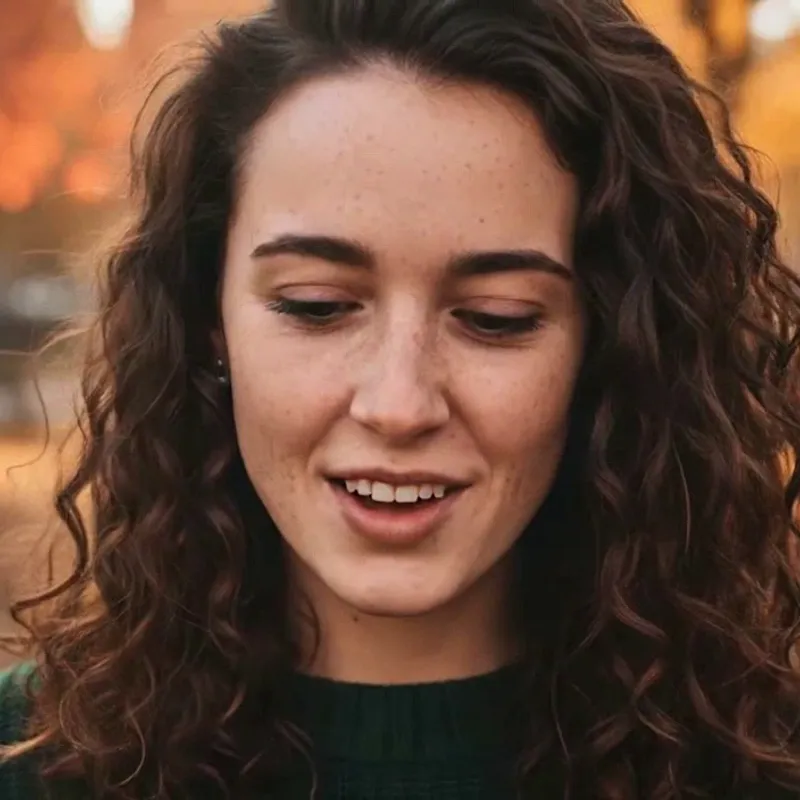 0:05
Style
15 credits for a 5-second clip
- Cannot cut or clip long video here
- One photo in, one 5-second clip out: 15 credits, paid only
- Free with sign-up: 10 credits = 1 image (photo editor only, not video)
- GitHub stars on the repository, with 919 forks (repo page and GitHub’s API, Nov 21, 2026)
- 3.9k
- license commits in two days: Nov 18 and Nov 19, 2026, per GitHub’s history of the LICENSE file
- 2
- self-hosted software vs the hosted Pro plan a month, as supoclip.com lists them; the AI keys you bring are extra
- $0 vs $9.99
What is SupoClip GitHub? The repository in short
The repository github.com/FujiwaraChoki/supoclip describes itself as an open-source alternative to OpusClip, and its README calls SupoClip an AI-powered video clipping tool. You give it a long video, such as a podcast, a talk or a stream recording, and it looks for the moments most likely to be shared, scores them, and renders vertical 9:16 clips with a face-centred crop, word-synced subtitles, hook titles and optional B-roll. The README lists input from YouTube, Twitch and Kick (recordings and clips) or an upload; live streams are not supported. It says the AI picks about 3 to 7 segments per video, using Gemini, GPT, Claude or a local Ollama model, and shows scores for hook, engagement, value and shareability. There is also a built-in editor and publishing to YouTube, TikTok and Instagram accounts you connect. We read all of this; we did not run any of it.
- Long video in, vertical clips with subtitles out
- Input: YouTube, Twitch, Kick or an upload; no live streams
- Five ways in: hosted site, iOS app, self-host, MCP server, REST API
0:05Who makes SupoClip, and what we could not tie together
The repository sits under a personal GitHub account, FujiwaraChoki, created on Jul 28, 2025 and still receiving pushes on Nov 21, 2026 (GitHub’s API shows a push at 07:39 UTC that morning). The license is held by Shiori LLC, and supoclip.com says it is a product of Shiori LLC, footer 2026. A launch article dated Oct 15, 2026 credits a builder called Sami Hindi, and the first commit on the license file in GitHub’s history, from Jul 28, 2025, is by an author of that name. No page we read says that FujiwaraChoki, Sami Hindi and Shiori LLC are the same person or one company, so we do not claim it. The hosted site, the iOS app and the open-source repository are described as one project, with the hosted plans covered by their own terms, not by the license.
- Repo owner: FujiwaraChoki (a user account)
- Licensor and site owner: Shiori LLC
- Link between the names: not stated anywhere we read
 0:05
The SupoClip GitHub license changed on Nov 18 and Nov 19
This is the part to read before you copy the code. The repository’s LICENSE file is now the SupoClip Noncommercial Source License, version 1.1, dated Nov 19, 2026, with Shiori LLC as licensor. GitHub’s history of that file lists two commits: Nov 18, “Adopt the Shiori LLC noncommercial source license”, and Nov 19, “free monetized self-hosting for individual creators (license v1.1)”. Two third-party pages we read, a directory listing updated Oct 15 and a launch article dated Oct 15, say SupoClip is AGPL-3.0, and GitHub’s own license field for the repository shows “Other”, not an open-source identifier. We could not confirm which releases, if any, went out under AGPL-3.0; the README only says earlier releases keep the rights they were released under. So “open source” in the sense of the source being public is true, but the current terms are not an OSI-style license, and the older AGPL claim may be out of date. Read the file yourself; this is not legal advice.
- Now: noncommercial source license v1.1 (Shiori LLC)
- Third-party pages dated Oct 15 still say AGPL-3.0
- GitHub’s license field for the repo: “Other”
0:05What the license lets you do, in its own words
As we read the file and the README’s license FAQ: self-hosting, copying, modifying and sharing for noncommercial purposes need no request. An individual creator, meaning one person acting for their own account, may self-host and earn from clips on their own channels, including paid clipping campaigns, without asking. Written permission from Shiori LLC is needed for commercial use, which includes internal business use, client work, team use and charging for access, and for any hosted or managed service offered to others, even a free tier of a commercial service. Using one person’s account on behalf of a company does not count as individual use. You must keep notices, add the SupoClip credit with both URLs where the license says (README, packaged builds, container images), and mark a fork as modified. Clips you make need no attribution. The permission address is support@supoclip.com. The software is provided as is, and the license says the licensor is not liable for losses such as demonetization or account strikes.
- Free: noncommercial use and individual creators on their own channels
- Ask first: companies, agencies, client work, teams, hosting it for others
- Clip output needs no attribution; the code needs the credit
0:05How to self-host it: the steps, each with its source
The README’s quick start (source: the repository README) has you clone the repository and enter the folder, create a .env file with ASSEMBLY_AI_API_KEY, LLM (its example is google-gla:gemini-3-flash-preview) and GOOGLE_API_KEY, then run docker-compose up -d and docker-compose logs -f. The first start takes a few minutes; then the app is at localhost:3107 and the API at localhost:8000, with docs at /docs. The setup guide (docs/setup.md) goes further: copy .env.example to .env, set at least the transcription key, LLM, the matching provider key, BETTER_AUTH_SECRET and, in hosted mode, BACKEND_AUTH_SECRET, then start with ./start.sh or docker-compose up -d --build. Its first step says to clone “your-repo-url”, so use the repository address from the README. The two documents differ in detail, so read both. Before you run anything, open .env.example, docker-compose.yml and any script such as start.sh, see which keys and ports they use, and do not paste secrets you do not understand.
- README: clone, .env with three variables, docker-compose up -d
- Setup guide: copy .env.example, add two auth secrets, or run start.sh
- Read the compose file and scripts before running them
0:05What it needs: keys, Docker, and no GPU requirement
Three things are required by the README: Docker, an AssemblyAI API key for transcription, and one language-model key (Google, OpenAI, Anthropic or OpenRouter, or a local or remote Ollama server). Both services bill you per use on your own account; we did not read their price pages, so we cannot give a cost per hour. The configuration guide adds that an Anthropic key is also used to draft social captions whatever model you pick, and lists optional keys: Pexels for B-roll, YouTube and download helpers such as Apify or RapidAPI (paid, with caps), and OAuth apps if you want to publish to YouTube, TikTok or Instagram, where some platforms restrict unaudited apps. The Docker stack starts a frontend, a backend, a worker, PostgreSQL and Redis. The setup guide says no GPU is required: CPU-only builds are the template default, and Apple Silicon runs the amd64 images under emulation, which can time out YouTube checks. It states no RAM, disk or CPU minimum, so we cannot give one.
- Required: Docker, AssemblyAI key, one language-model key
- Optional: Pexels, download services, publishing apps
- No GPU required; no RAM or disk figure stated
0:05What it costs: self-hosted vs the hosted site
supoclip.com lists, per month: Self-Hosted $0, Pro $9.99 (10 hours of source video, 720p, YouTube videos up to 90 minutes), Creator $24.99 (25 hours, 1080p, up to 3 hours) and Team $69 (3 seats, 60 pooled hours, $15 per extra seat). Hours count the length of the source video, not the clips. By our own arithmetic that is about $1.00 per source hour on Pro and on Creator, and about $1.15 on Team. It lists no free hosted tier and says there are no watermarks, hosted or self-hosted. The $0 line is the software only: you still supply the computer and pay AssemblyAI and the model provider for each run, and we did not price that. The page also calls self-hosting unlimited while the license restricts commercial use; it does not reconcile the two. For comparison, this site charges 15 credits for one 5-second photo clip, $1.50 on the smallest pack ($4.99 for 50 credits) and about $0.13 at the cheapest rate.
- Hosted: $9.99, $24.99, $69 a month; no free hosted tier listed
- Self-hosted: $0 for the code, you pay the AI services
- Our arithmetic: about $1 per source hour on Pro and Creator
0:05Honest limits of SupoClip, and of what we know
From its own pages: live streams are not supported; commercial use beyond an individual creator needs written permission; some features need extra setup, such as a local Ollama server; publishing needs your own platform apps. The repository page shows 20 open issues and 90 open pull requests (GitHub’s API counts 110 open together), which suggests a busy project but is not a quality score. The README’s headline is a rude line aimed at OpusClip, which tells you about the tone, not about the code. What we cannot tell you: how good the clips are, how fast it runs on your machine, what the AI keys cost per hour, or how the project will change next, given the license changed twice in two days. Treat an install as an experiment on a spare machine, with spending limits on your keys.
- No live streams; commercial use needs written permission
- 20 issues and 90 pull requests open on Nov 21
- Not run by us: no claim about clip quality or speed
0:05The other pages in the top results: varg.ai and RepoCloud
Of the five pages the picking step showed for this search, two are the repository and supoclip.com. The third, varg.ai, answered our fetch with HTTP 451 twice, so we could not read it; a web search for it next to SupoClip returned results describing varg.ai as a video-generation SDK and API and nothing linking it to SupoClip. The fifth, repocloud.io, is an app marketplace that deploys open-source software on a virtual server with root access; on its first listing page, one of 144, and in a search for the name, we did not find SupoClip, and we cannot rule out a listing elsewhere. A search for the phrase also returned an unexplained address, 169-58-182-10.sslip.io, titled as a hosted SupoClip; our connection was refused, nothing shows it is official, and we link it nowhere. Use the repository, or supoclip.com, which the repository itself names as its homepage.
- varg.ai: unreadable for us; no link to SupoClip seen
- repocloud.io: a marketplace; no SupoClip listing found
- An unexplained sslip.io host: not confirmed official; avoid
0:05What this site does instead: one photo, one 5-second clip
This site is not a clipper and has no code to download. It cannot take a podcast, a stream or a meeting recording and cut it into clips, add captions, track a face or reframe to 9:16. What its video tool does is narrower. You upload one photo (JPEG, PNG or WebP, up to 8 MB), pick one of 3 motion styles and get one silent MP4 clip, 5 seconds long at 720p, for 15 credits. Only credits that came from money, a pack or a plan, pay for a clip; the sign-up gift of 10 credits works for photo edits, not video. By our arithmetic one clip costs $1.50 on the smallest pack ($4.99 for 50 credits), $1.25 on the medium pack, $1.00 on the large pack, $0.30 on the monthly Basic plan, $0.20 on the monthly Pro plan, and $0.13 to $0.20 on the yearly plans if you use every credit each month. Failed or timed-out clips are refunded, and each person can start at most 20 clips a day. A use that fits: a still of a speaker turned into a short moving intro for a clip you cut with SupoClip or another tool. We made two clips on 2026-11-19: the portrait took 53 seconds and kept her face, and in the beagle clip the model added a person from about the third second. Both files are 1248 × 704, 5.04 seconds, with no audio. n = 2.
- Image to video only: no video in, no text-to-video
- Fixed length and size; no sound, captions or speech
- Paid credits only for video; failed clips refunded
0:05What this site can and cannot do next to SupoClip
It can
- Turn one photo into one 5-second, 720p silent MP4 clip
- Add gentle motion, a slow camera push-in or a breeze to that photo
- Edit a still photo in the editor (background, light, style)
- Refund a failed or timed-out clip automatically
It cannot
- Take a podcast, stream or any long video and find clips in it
- Transcribe speech, add captions, track a face or reframe to 9:16
- Import a YouTube, Twitch or Kick link
- Give you source code, a Docker setup or a self-hosted copy
- Use free credits for video: the sign-up gift does not pay for it
- Add sound, speech or music, or promise the model adds nothing you did not ask for
Compare
SupoClip GitHub, the hosted site and the other top results side by side
| Page | What it is | What it costs | What you supply | License or terms | What we could not confirm |
|---|---|---|---|---|---|
| GitHub repository (README and docs) | Open-source AI clipper, run with Docker; hosted app and iOS app also named | $0 for the code; AssemblyAI and the model provider bill you per use (not priced by us) | Docker, an AssemblyAI key, one model key; no GPU required; no RAM or disk figure | Noncommercial source license v1.1, Shiori LLC; commits Nov 18 and Nov 19, 2026 | Clip quality, speed, older AGPL claim, what start.sh does |
| supoclip.com, Pro and Creator | Hosted version of the same project; no watermarks claimed | $9.99 for 10 hours (about $1.00 an hour); $24.99 for 25 hours (about $1.00 an hour) | Nothing to install; a video link or upload | Terms of service of the hosted site, separate from the repository license | Yearly prices, free trial, what happens when hours run out |
| supoclip.com, Team | Shared workspace, roles, pooled hours | $69 a month with 3 seats and 60 pooled hours (about $1.15 an hour); $15 per extra seat | Nothing to install | Hosted terms, separate from the repository license; we did not read what they say about commercial use | Processing times, models used on the hosted site |
| repocloud.io (third-party marketplace) | Deploys open-source apps on a virtual server you control | Free credit for 30 days, amount and later prices not shown on the page we read | Server administration: root access is yours to manage | Not stated for SupoClip: no listing found | Whether SupoClip is listed beyond page 1 of 144 |
| varg.ai (third-party result) | Described by a search as a video-generation API; page not readable by us (HTTP 451) | Not stated | Not stated | Not stated | Everything on the page; no link to SupoClip seen in search results |
| This site (photo to clip only) | Not a clipper; one photo in, one clip out | 15 credits a clip, about $0.13 to $1.50; paid credits only | One photo (up to 8 MB); no keys, no install | This site’s own terms; no source code offered | 5-second 720p MP4, 1248 × 704 measured, no sound; n = 2 |
Step by step
Decide whether to self-host, then what to do here
Cutting your own long recordings for your own channels, with a spare computer and Docker: the repository. No setup and a small monthly fee: the hosted site. Work for a company, a client or a team, or offering it to others: you need Shiori LLC’s written permission, or a hosted plan under its terms. One photo you want to move: this site.
Open the LICENSE file and the license FAQ in the README. Then open .env.example and docker-compose.yml, and any script you plan to run, such as start.sh, and look at which keys and ports they use. Set spending limits on your AssemblyAI and model-provider accounts, and change the default secret and database password, as the configuration guide says.
Sign in and get a pack or a plan: a clip is 15 credits and only credits that came from money pay for it. Upload one clear photo you have the right to use, pick Bring it to life, Slow camera push-in or Hair and clothes in a breeze, and leave the tab open: our two runs took 34 and 53 seconds.
Check that nothing was added that you did not ask for, as happened with our beagle. Failed or timed-out clips are refunded automatically; a clip you simply dislike is not, so you can run another style.
SupoClip GitHub: what each page says, read Nov 21, 2026
The repository and its documents
- Repository page and README: an open-source, AI-powered video clipping tool; long video to vertical 9:16 clips with face-centred crop, word-synced subtitles, hook titles, optional B-roll; input YouTube, Twitch, Kick or upload; AI picks about 3 to 7 segments with Gemini, GPT, Claude or local Ollama; scores; editor; publishing; hosted web app, iOS app, self-host, MCP server, REST API; requires Docker, an AssemblyAI key and one language-model key; quick start commands; frontend localhost:3107, backend localhost:8000; live streams not supported; earlier releases keep the rights they were released under. Page showed 3.9k stars, 919 forks, 20 open issues, 90 pull requests, 855 commits. Page itself shows no last-commit date.Source: github.com/FujiwaraChoki/supoclip (vendor’s own claims) ·
- License: SupoClip Noncommercial Source License, version 1.1, dated Nov 19, 2026, licensor Shiori LLC. Noncommercial self-hosting, copying, modifying and sharing allowed; individual creators may self-host and earn from their own channels; commercial use, hosted or managed services and organisation use need written permission (support@supoclip.com); attribution to keep; clip output needs none; rights end on breach; provided as is. Our reading, not legal advice.Source: LICENSE file in the repository ·
- Setup guide: Docker Desktop or Engine with Compose, and Git; copy .env.example to .env; set at least ASSEMBLY_AI_API_KEY, LLM, the matching provider key, BETTER_AUTH_SECRET and, in hosted mode, BACKEND_AUTH_SECRET; run ./start.sh or docker-compose up -d --build; services frontend, backend, worker, PostgreSQL, Redis (optional cron worker). No GPU required (CPU-only default). No RAM or disk figure. Apple Silicon runs amd64 images under emulation. docker-compose down -v deletes database data. Step 1 reads “git clone your-repo-url”.Source: docs/setup.md in the repository ·
- Configuration guide: over 150 variables; required transcription key, LLM and matching provider key; an Anthropic key is also used for social caption drafting; optional Pexels, Giphy, Apify, RapidAPI, YouTube Data API, OAuth apps for publishing, Stripe and SES for hosted mode; AssemblyAI billed per use, models per token except local Ollama; change the default auth secret and database password; keep keys out of NEXT_PUBLIC variables.Source: docs/configuration.md in the repository ·
- GitHub’s API for the repository, read the same day: description “An open-source OpusClip alternative”, license field “Other”, 3,928 stars, 919 forks, 110 open issues and pull requests together, created Jul 28, 2025, last push Nov 21, 2026 at 07:39 UTC, owner a user account, language Python, not archived. LICENSE history: Nov 19, 2026 21:08 UTC “free monetized self-hosting for individual creators (license v1.1)”; Nov 18, 2026 09:27 UTC “Adopt the Shiori LLC noncommercial source license”; Jul 28, 2025 an earlier commit by an author named Sami Hindi. Read through a summarising tool.Source: api.github.com (GitHub, read via a summarising tool) ·
supoclip.com, the hosted site
- Open-source AI clipper for YouTube, Twitch and Kick recordings and uploads, with 9:16 reframing, word-level captions, scores out of 100, editor and publishing to YouTube Shorts and TikTok (Instagram “coming soon”). Per month: Self-Hosted $0, Pro $9.99 (10 hours, 720p, YouTube up to 90 minutes), Creator $24.99 (25 hours, 1080p, up to 3 hours, priority, scheduling), Team $69 (3 seats, 60 pooled hours, 300 pooled AI edits, $15 per extra seat adding 15 hours); yearly “2 months free”, no yearly amounts; hours are source-video length and reset monthly. No free hosted tier listed; no watermarks claimed; 99+ spoken languages. A product of Shiori LLC, footer 2026. Not stated: free trial, yearly prices, what happens when hours run out, processing times, which models the hosted site uses.Source: supoclip.com (vendor’s own claims) ·
Third-party pages, with an older license claim
- A directory listing, “Updated” Oct 15, 2026: says AGPL-3.0, free self-hosting, Docker, your own keys and usage costs; names no developer. Its license line does not match the repository’s file today.Source: completeaitraining.com (a third-party directory) ·
- A news-style article dated Oct 15, 2026: credits a builder named Sami Hindi, says Product Hunt launch on Oct 11, AGPL-3.0, segments of 15 to 60 seconds, a 0 to 100 score, no watermarks. The README we read speaks of about 3 to 7 segments per video, a count, not a length, so the two are not in conflict.Source: aitoolly.com (a third-party news page) ·
- repocloud.io: an open-source app marketplace (“Deploy, host, and scale with one click”) on a dedicated virtual server with root access, free credit for the first 30 days with no amount shown. No SupoClip listing on its first of 144 listing pages or in a search for the name.Source: repocloud.io home ·
Made and measured on this site, 2026-11-19
- Two clips on this site’s video tool with paid credits: portrait with “Bring it to life”, 53 seconds; beagle with “Slow camera push-in”, 34 seconds; both 1248 × 704, 5.04 s, H.264, no audio, no visible watermark. In the beagle clip a person enters from the right from about the third second. n = 2. Prices on this page come from this site’s own settings; the per-hour figures for supoclip.com are our own arithmetic from its plan numbers.Source: This site, first-hand ·
- What clipping AI is and how it works, what to check before picking a tool, and the common traps in the numbers.Source: Clipping AI ·
- Five clipping tools side by side: free plan, price and watermark, and a photo option.Source: Free clipping AI ·
- OpusClip and four other free plans, item by item: watermark, quality, minutes, uploads and storage.Source: OpusClip free plan ·
- A desktop clipper that runs on your own computer, and what this site does instead.Source: Clipship alternative ·
- What “no restrictions” means for video tools, and the full limits of this site’s clip tool.Source: Free AI video generator, no restrictions ·
- The rules for photos and results on this site, in full.Source: Acceptable-use policy ·
Not confirmed
- Whether the AGPL-3.0 that two third-party pages state was ever in the repository’s license file, and which releases carry which license: we read the file as it is today and GitHub’s commit dates, not the older text. Whether FujiwaraChoki, Sami Hindi and Shiori LLC are one person or company. How good the clips are, how fast it runs, how much memory, disk or processor it needs. What AssemblyAI and the model providers charge per hour. Yearly hosted prices. What start.sh does: we did not read it. Anything on varg.ai, which refused our fetch. Whether repocloud.io lists SupoClip beyond its first page. None of the tools was run by us.Source: The pages above ·
- The pages were read through a tool that summarises each one, so a figure can be mis-summarised; check anything you rely on on the page itself. Our web search is not Google and shows no real result order. The GitHub page itself shows no date for its last commit; dates here come from GitHub’s API.Source: Web search and GitHub API, 2026-11-21 ·
Other pages on this site
Clipper explainers and comparisons, the photo clip tool and photo edits

FAQ
Questions, answered
What is SupoClip on GitHub?
The repository FujiwaraChoki/supoclip: an AI video clipper whose README says it finds the most shareable moments in a long video and renders vertical 9:16 clips with face-centred cropping, word-synced subtitles and hook titles. It names a hosted web app, an iOS app, Docker self-hosting, an MCP server and a REST API. We read it; we did not run it.
What is the SupoClip license?
Today the repository’s LICENSE file is the SupoClip Noncommercial Source License, version 1.1, dated Nov 19, 2026, held by Shiori LLC, after commits on Nov 18 and Nov 19. Noncommercial use and individual creators on their own channels are free; companies, client work and hosting it for others need written permission. Third-party pages dated Oct 15 say AGPL-3.0, which we could not confirm. Read the file; this is not legal advice.
Is SupoClip free, and is it really open source?
The code is public and free to self-host for noncommercial use and for individual creators, but you pay AssemblyAI and a language-model provider for each run, and the hosted site is paid: Pro $9.99 a month, Creator $24.99, Team $69, with no free hosted tier listed. The license is a source-available, noncommercial one, not an AGPL-style one as older pages say.
How do I self-host SupoClip with Docker?
Per the README: clone the repository, create a .env file with your AssemblyAI key, a model name and its provider key, run docker-compose up -d, then open localhost:3107 after a few minutes. The setup guide also has you copy .env.example and set two auth secrets. Read the compose file and any script first; we did not run these steps.
What does SupoClip need: an API key, a GPU, how much memory?
Docker, an AssemblyAI key and one language-model key (Google, OpenAI, Anthropic, OpenRouter or Ollama). The setup guide says no GPU is required and CPU-only builds are the default. It gives no RAM or disk figure, so we cannot. Optional keys cover B-roll, downloads and publishing to social accounts.
SupoClip vs OpusClip: which one should I use?
We tested neither. SupoClip’s README presents itself as an alternative to OpusClip with self-hosting and no watermarks; its hosted Pro plan is $9.99 a month for 10 hours of source video. For OpusClip’s free-plan limits, read our OpusClip free plan page, and for the category and what to check, our clipping AI page.
Can this site clip a long video, or run SupoClip for me?
No. This site cannot cut a long video into clips, add captions, track a face or reframe to 9:16, and it does not host or sell SupoClip. It turns one photo into one silent 5-second 720p clip for 15 credits (about $0.13 to $1.50), paid credits only. About the sign-up gift: Partly: new accounts get 10 free credits after signing in, enough for 1 free image (once per account, valid for 7 days, while the day's new-account gifts last). That gift works for photo edits, not video.
Which SupoClip pages are the real ones?
The repository github.com/FujiwaraChoki/supoclip and supoclip.com, which GitHub lists as the repository’s homepage. We could not read varg.ai, found no SupoClip listing on repocloud.io, and could not confirm that an unexplained sslip.io address shown in search results is official; do not enter keys or payment details on a page you cannot tie to the repository.
Want one photo to move?
Upload one photo, pick a motion style and get a 5-second clip for 15 credits. For long videos, use a clipping tool.
Make a clip hereIndependent site. Not affiliated with or endorsed by SupoClip, Shiori LLC, FujiwaraChoki, OpusClip, RepoCloud, varg.ai, ByteDance, kie.ai or any other tool or site named here, and this site is not any of them. Names are used only to say what their pages state. Facts about other tools come from their own pages, read on 2026-11-21, and were not tested by us; features, prices, licenses and limits may change. Nothing here is legal advice; read a license yourself. Clip examples are made from this site’s own fictional, AI-generated photos.