Free AI video generator no restrictions: what is free, what is not, and what this one does
Free AI video generator no restrictions is not something this site offers: it turns one photo into a silent 5-second 720p clip in one of 3 motion styles for 15 credits (about $0.13 to $1.50 a clip), paid credits only, and it still refuses sexual content, minors and real-person likeness.
 0:05
Style
15 credits for a 5-second clip
- Free with sign-up: 10 credits = 1 image (photo editor only, not video)
- Video needs paid credits: 15 per clip
- Refuses sexual content, minors and real-person likeness
- credits bought in a pack or plan pay for video; the sign-up gift does not
- Paid only
- one silent clip per photo
- 5 s · 720p
- per clip, about $0.13 to $1.50
- 15 credits
- from button to finished clip in our 2 runs
- 34 s and 53 s
What does “free AI video generator no restrictions” mean?
People who type this usually mean one or more of five things, and they are not the same thing: no price, no sign-up, no watermark, no daily cap, or no content filter. Tools offer some of them and rarely all. In the pages we read, the free tiers are capped (free GPU minutes, one clip, 2 clips a day, free credits), some add a watermark or ads, and the one tool that spells out its content rules blocks sexual content and minors on every plan. A guide we read says the phrase usually means fewer blocked prompts, not anything at all. One page with this exact headline named no model, gave no limits and showed no sample. Read “no restrictions” as marketing, and check each tool’s own limits.
- Free: usually a capped free tier, ads or a watermark
- No sign-up: claimed by a few tools, untested by us
- No filter: no reputable tool we read promises it
0:05What is free here, and what is not?
For video, nothing is free here. A clip costs 15 credits, and only credits that came from money, a pack or a plan, can pay for it. The sign-up gift of 10 credits still works for photo edits in the editor, but it does not pay for video, and no other free credit does either. By our own arithmetic from the credit prices, one clip costs $1.50 on the smallest pack ($4.99 for 50 credits), $1.25 on the medium pack, $1.00 on the large pack, $0.30 on the monthly Basic plan, $0.20 on the monthly Pro plan, and $0.13 to $0.20 on the yearly plans if you use every credit each month. Failed or timed-out clips are refunded automatically, and each person can start at most 20 clips a day. Video can also be paused while the provider has trouble, and the card then says so instead of charging you.
- 15 credits per clip, paid credits only
- About $0.13 to $1.50 a clip, depending on what you bought
- Failed or timed-out clips are refunded
- At most 20 clips per person per day
 0:05
What do you get: one photo, one 5-second clip
You upload exactly one photo (JPEG, PNG or WebP, up to 8 MB), pick one of 3 motion styles and get one MP4 clip without sound, 5 seconds long at 720p. There is no written prompt: “Bring it to life” asks the model for gentle motion such as soft breathing, small head and eye movements and a slight smile, with a still camera. “Slow camera push-in” asks for a slow cinematic push toward the main subject with very subtle movement of the subject. “Hair and clothes in a breeze” asks for a light breeze moving hair, clothes and loose things, with a still camera. All three also tell the model to keep faces, hair, clothes and background as in the photo, to keep everyone dressed, and to add no text, logos or watermarks. The model is ByteDance’s Seedance V1 Pro Fast, called through kie.ai.
- Image to video only: no text-to-video, no second photo
- Fixed length and size: no choosing seconds or resolution
- No sound, no talking or lip-sync
0:05What we measured: two real clips on 2026-11-19
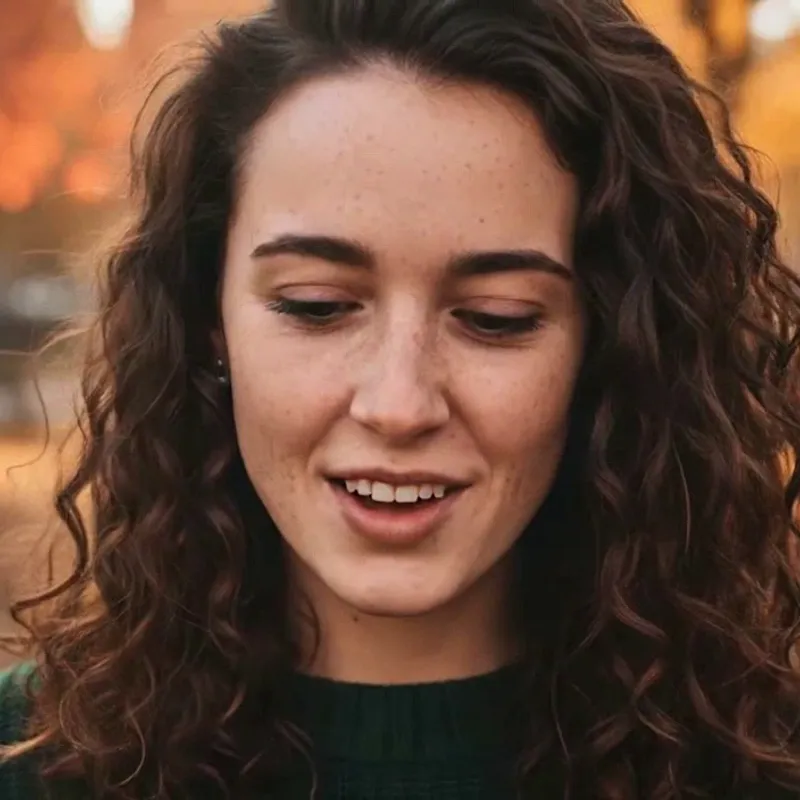
We made two clips on this site’s video tool, with the site’s own fictional, AI-generated photos. The portrait with “Bring it to life” took 53 seconds from pressing the button to a finished clip: in the frames we checked, she smiles, her eyes move and her head turns to one side and back to the camera, and her face and curly hair stay recognisable. The beagle with “Slow camera push-in” took 34 seconds, and the camera does push in on the dog. But from about the third second the model added a person nobody asked for: a hand and then a smiling face enter from the right and the dog turns toward them. Both files are 1248 × 704 pixels, 5.04 seconds, H.264, with no audio, and we saw no visible watermark. Two runs are not a test of every photo, so check every clip before you use it.
- Portrait: face kept; smile, eye movement, a head turn and back
- Beagle: camera push-in worked, then a person was added
- n = 2: a finding, not a failure rate
0:05What limits remain, and why
This site is not a no-rules tool. Every upload asks you to confirm that you have the right to use the photo and are 18 or older, and sign-in is required. The acceptable-use policy bars sexual content, anything sexual or suggestive involving a minor, making someone look like a real or famous person, harassment, gore and hate symbols, and trying to get around the checks. Our video request also tells the model to keep everyone fully dressed, and the request to kie.ai asks its safety checker to run. We do not know exactly what that checker blocks, and its own page says nothing can be guaranteed to be filtered out, so we do not promise it. Why we keep these limits: a real person in a clip cannot consent, and the one tool we read that lists its rules bars the same things.
- No sexual content, no minors, no real-person likeness
- Right-to-use and 18+ confirmation on every upload
- Provider safety checker on: what it blocks is not published
0:05What the video tool can and cannot do
It can
- Turn one photo into one 5-second, 720p MP4 clip
- Add gentle motion, a slow camera push-in or a breeze
- Keep a face recognisable in our two runs
- Refund a failed or timed-out clip automatically
It cannot
- Use free credits: the sign-up gift does not pay for video
- Make text-to-video, take two photos, or run longer clips
- Add sound, music, speech, lip-sync or a talking avatar
- 4K video, or a choice of length or resolution
- Promise that the model adds nothing you did not ask for
- Make sexual content, minors in edits, or a real or famous person
Compare
What free video tools state, and what this site does
| Tool | Free allowance | Account | Watermark | Clip and resolution | Content rules stated |
|---|---|---|---|---|---|
| Upsampler | Claims many free generations a day and free GPU minutes; numbers not stated | Claims none needed | Claims none | 2 to 5 s at 480p to 512p on free models; longer and up to 1080p when paid | Filter on uploads and prompts; sexual content and minors blocked on every plan |
| LoreMotion | One free clip; claims unlimited with a free account; ad-supported | None for the first clip; a free account for more | Claims none | 3, 5 or 8 s; 720p MP4 | Not stated |
| HeyGen | 2 free clips a day shown; daily or monthly limits may apply | Sign-in link; whether needed not stated | Free plan has one | Not stated | Terms and moderation policy linked; contents not read |
| Fotor | Free credits for new accounts and daily check-ins; amounts not stated | Registered accounts get the credits | Not stated | 3 to 15 s; 720p, 1080p and 4K listed, free ones not stated | Calls it unrestricted; no policy on the page |
| Page headed with the exact phrase (onrender.com) | Claims free and unlimited; no evidence | Claims none | Not mentioned | No model, length or resolution named | None |
| This site (photo to clip only) | None for video: paid credits only, 15 per clip (about $0.13 to $1.50); the sign-up gift pays for photo edits only | Sign-in required; 18+ and right-to-use box on every upload | None seen in our 2 clips; invisible marks not checked | 5 s, 720p (1248 × 704 measured), no sound; fixed | Acceptable-use policy; provider checker on, its rules not published |
Step by step
How to make a 5-second clip from a photo here
Sign in and get a pack or a plan. A clip costs 15 credits and only credits that came from money pay for it; the sign-up gift does not. If video is paused, the card says so and charges nothing.
One subject, good light, face or main subject clearly visible. JPEG, PNG or WebP, up to 8 MB. Tick the box that you have the right to use it and are 18 or older.
Bring it to life, Slow camera push-in, or Hair and clothes in a breeze. There is no text prompt. In our two runs a clip took 34 and 53 seconds, so leave the tab open.
Check that nothing was added that you did not ask for, as happened with our beagle. Failed or timed-out clips are refunded automatically; a clip you simply dislike is not, so you can run another style.
What we read, what we made, and what we could not confirm
What “no restrictions” means, in the pages we read
- A blog guide to “no restrictions” generators that ranks its own product first. It says the phrase usually means fewer blocked prompts, looser content handling or broader model access, not literal freedom, and that “no restrictions” in cloud AI never means anything at all. It names Crepal, Mage, Venice and BasedLabs, and gives no tested numbers.Source: CrePal blog (the publisher sells a competing product) ·
- A resource page that uses the phrase loosely, as free use without technical hurdles or usage limits. It lists CapCut’s desktop editor, SendFame, Kapwing, Fotor and Vider.ai, states no limits for most, says Kapwing’s free version adds watermarks and says advanced SendFame features need a paid subscription.Source: CapCut resource page (CapCut is its publisher) ·
- A landing page headed with this exact phrase. It promises free, unlimited, no sign-up use, names no model, shows no sample or screenshot, gives no company and no limits, and says only that limits vary by platform. We could not confirm that it works.Source: Uncensored AI Video page (onrender.com) ·
Free video tools, as they state themselves
- States no registration and no watermark, with many free generations a day and free GPU minutes (numbers not stated). Free models give 2 to 5 second clips at 480p to 512p; paid plans add longer clips and up to 1080p. An automated filter screens uploads and prompts, and sexually explicit content and anything involving minors is blocked on every plan.Source: Upsampler (self-reported, not tested by us) ·
- States that the first video needs no sign-up (one free clip), that a free account gives unlimited generations, no watermark, ad-supported use, clips of 3, 5 or 8 seconds at 720p, and premium plans from $5 a month. Its content rules were not stated on the page.Source: LoreMotion (self-reported, not tested by us) ·
- The free plan includes a watermark and is called ideal for testing and non-commercial use. The generator shows 2 free clips a day, with daily or monthly limits possible. Paid plans start at $49 a month. Clip length, resolution and content rules were not stated on the page.Source: HeyGen (self-reported, not tested by us) ·
- Gives free credits to newly registered accounts and extra daily check-in credits, lets you set 3 to 15 seconds, and lists 720p, 1080p and 4K exports without saying which are free. It calls the generator unrestricted but states no content policy or watermark rule on that page.Source: Fotor (self-reported, not tested by us) ·
The model behind this site’s video tool
- The API takes a required prompt, one image (JPEG, PNG or WebP up to 10 MB), 720p or 1080p, and 5 or 10 seconds. It has a boolean nsfw_checker option that is off by default; this site turns it on and fixes the clip at 5 seconds and 720p. The page says nothing about audio and does not state a price.Source: kie.ai API docs ·
- The model page says billing is per video, and lists 16 kie credits, US$0.08, for 5 seconds at 720p. Its notes say the safety checker is always on in its own playground and that nothing guarantees that everything is filtered out.Source: kie.ai model page ·
Made and measured on this site, 2026-11-19
- Two clips on staging with paid credits: portrait with “Bring it to life”, 53 seconds; beagle with “Slow camera push-in”, 34 seconds; both 1248 × 704, 5.04 s, H.264, no audio, no visible watermark. In the beagle clip a person enters from the right from about the third second. n = 2. We did not test any other tool and did not test a failed or refunded clip against the real provider.Source: This site, first-hand ·
- The same question for still images: what five image tools state, and what this site refuses.Source: Free AI image generator, no restrictions ·
- The photo editor: one photo in, one 1024 × 1024 image out, and where the sign-up gift can be used.Source: AI photo editor ·
- What Seedance is, version by version, from the pages we read; this video tool uses one of its versions through kie.ai.Source: Seedance: ByteDance’s AI video model ·
- Other video models we have written up: LongCat Video, LTX 2.5, and Wan 2.2 and Wan 2.1. Those pages describe the models, not what this tool runs.Source: LongCat Video, what it is ·
- The rules for photos and results on this site, in full.Source: Acceptable-use policy ·
Not confirmed
- Whether any free tool above behaves as it says: every number and claim is the tool’s own, and we tested none of them.Source: All tool pages above ·
- Upsampler’s free GPU minutes and daily count, HeyGen’s clip length and content rules, Fotor’s watermark and free-tier limits and content rules, and LoreMotion’s content rules: the pages we read did not state them.Source: Upsampler, HeyGen, Fotor, LoreMotion ·
- What kie.ai’s safety checker blocks, and whether the clips carry an invisible mark: not published or not checked.Source: kie.ai ·
- How often the model adds things you did not ask for: we saw it once in two clips and cannot give a rate. Who runs the onrender.com page: not stated.Source: This site, first-hand; onrender.com page ·
- The first two and the fourth of the five domains a web-search tool (not Google) listed first for the phrase were not opened by us: presentationbuilder.internationaltrucks.com, grandavehousing.calpoly.edu and byteplus.com, which redirected to another page. We quote nothing from them.Source: Web search, 2026-11-19 ·
Photo tools on this site
Still-image edits, effects and model write-ups next to the video tool
FAQ
Questions, answered
Is there a free AI video generator with no restrictions?
Not in full, and not here. Tools that use the phrase usually mean a capped free tier, or fewer blocked prompts, and the one that spells out its rules blocks sexual content and minors. This site makes video only from paid credits: 15 credits for one 5-second clip, about $0.13 to $1.50, and it refuses sexual content, minors and real-person likeness.
Is video free here, and does the sign-up gift pay for it?
No, not for video. About the sign-up gift: Partly: new accounts get 10 free credits after signing in, enough for 1 free image (once per account, valid for 7 days, while the day's new-account gifts last). That gift works for photo edits in the editor, not for video: only credits bought in a pack or plan pay for a clip, and a request with only free credits is refused before anything is charged.
How much does one AI video clip cost here?
15 credits per clip, always. By our arithmetic from the credit prices that is $1.50 on the smallest pack ($4.99 for 50 credits), $1.25 on the medium pack, $1.00 on the large pack, $0.30 on the monthly Basic plan, $0.20 on the monthly Pro plan, and $0.13 to $0.20 on the yearly plans if you use every credit each month. A failed or timed-out clip is refunded automatically.
Is there a free AI video generator with no watermark and no sign-up?
Some tools claim it: Upsampler says no registration and no watermark, and LoreMotion says the first video needs no sign-up and has no watermark. We did not test either claim, and HeyGen’s free plan states a watermark. Here, sign-in is required and every upload asks for an 18+ and right-to-use confirmation. We saw no visible watermark in our two clips and did not check for invisible marks.
What exactly does the AI video generator here make?
One 5-second, 720p MP4 clip without sound from one photo, in one of 3 motion styles: Bring it to life, Slow camera push-in, or Hair and clothes in a breeze. There is no text-to-video, no second photo, no talking avatar, no 4K and no choice of length. Our two real clips took 34 and 53 seconds, measured on 2026-11-19.
Can I make unlimited, uncensored or NSFW videos?
No. Each person can start at most 20 clips a day, the acceptable-use policy bars sexual content and anything sexual or suggestive involving a minor, and the provider’s safety checker is switched on. We do not publish ways around the checks, and the checks are not perfect.
Why did a person appear in my clip?
The model sometimes adds things that were not in your photo or in the style. In our beagle clip a hand and a smiling face entered from the right from about the third second, although nothing asked for a person. We saw it once in two runs and cannot give a rate, so watch every clip before you use it.
What if my clip fails or video is switched off?
A failed or timed-out clip is refunded automatically. Video sits behind a switch and may be paused when the provider has trouble; the card then shows that it is unavailable and does not charge you. A clip you only dislike is not refunded.
Want one photo to move?
Upload one photo, pick a motion style and get a 5-second clip for 15 credits.
Make a clip hereIndependent site. Not affiliated with or endorsed by ByteDance, kie.ai, Upsampler, LoreMotion, HeyGen, Fotor, CapCut, CrePal or any other tool named here. Names are used only to say what their pages state. Facts about other tools come from their own pages, read on 2026-11-19, and were not tested by us; prices, limits and availability may change. Clip examples are made from this site’s own fictional, AI-generated photos. This is not legal advice.