Prompt AI edits: copy-ready photo edit prompts that keep your face
Prompt AI edits are written instructions that tell an image model how to change a photo you upload, and on this site you write one change plus one keep line, then get a 1024 × 1024 edit in about 37 seconds for 10 credits an image. Free with sign-up: 10 credits = 1 image, then from $0.13 on a monthly plan.
 Your photo
Style changes (cartoon, 3D, anime) are not reliable yet. If the result looks unchanged, try again or describe the change more specifically.
One-tap edits
- One photo in, one edited photo out
- Photos only: no video, no face swap
- Free with sign-up: 10 credits = 1 image
- for a photo edit here
- ≈ 37 s
- per image edited here
- 10 credits
- the photo after our vague prompt (mean brightness, 1 run)
- 18% darker
- face-match scores of our 2 runs (1 = identical)
- 0.92 and 0.93
What “prompt AI edits” means
The phrase is used two ways. Many results for it are about editing a prompt with AI, such as help pages for prompt editors and a guide on using an AI to rewrite a text prompt. The other use, and the one this page covers, is a prompt that edits a photo: a plain-language instruction sent with your image, which the model uses to decide what to change and what to leave alone. Our search tool is not Google, so we cannot say which meaning most searchers want. A related page on this site covers the brand-like spelling Prompt AI Editz, which is a name several sites use; this one is about how to write the edit itself.
- Meaning 1: using AI to improve a prompt (not covered here)
- Meaning 2: a prompt that edits your photo (this page)
- No site named “Prompt AI Edits” turned up in our searches
How to write a prompt AI edit that keeps your face
Write two lines: what changes, and what must stay. Recraft’s guide says to upload the photo, write one change and one keep line, then generate; it names faces, labels, framing and lighting as things to keep. Aiarty’s Gemini page builds prompts from a subject, a task, a style target and a restriction on what stays unchanged, and Luma’s page lists subject, action, preservation and style. We kept to that: one change, a list of what stays, and “No text, logos or watermarks.” Here the request can be up to 400 characters; ours were about 200.
- One change per prompt (Recraft: keep one edit per prompt)
- Name what stays: face, hair, expression, clothes, background
- Describe the result you want, not vague words like “better”
What we ran: a vague prompt and a structured one, same photo
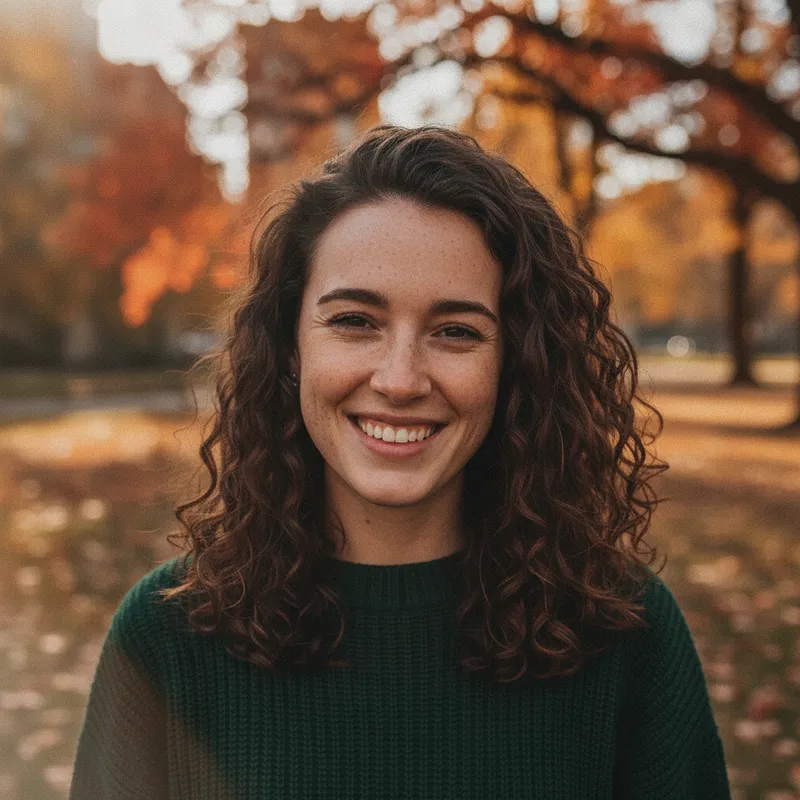
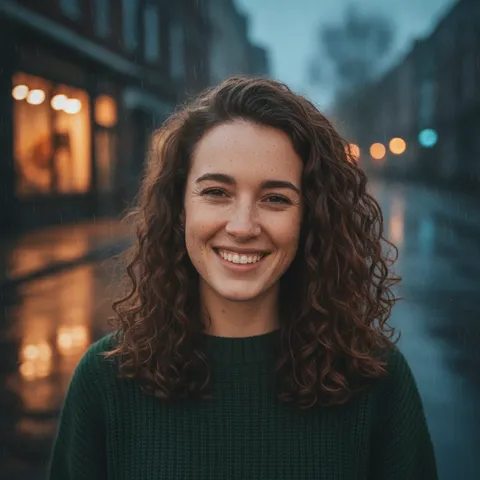
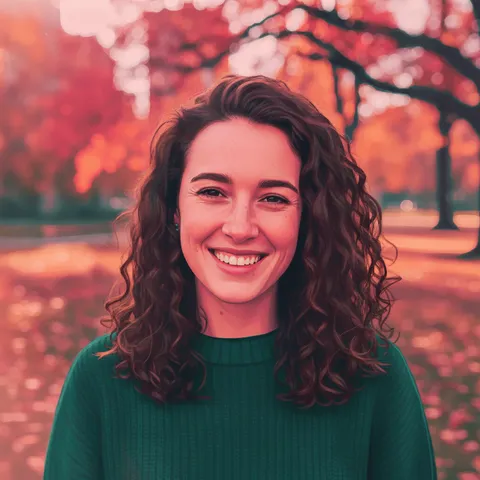
On 2026-11-19 we ran two prompts, once each, on one fictional AI portrait. The vague one, “Make it look better and more cinematic.”, kept the face (score 0.92) but changed the whole photo: mean brightness fell from 103.9 to 85.1, about 18% darker, with more contrast and a heavier grade. The structured one, a golden-hour backlight with a keep line, scored 0.93 and stayed at 104.5 brightness, so it changed the light and left the rest alone. Each took about 25 seconds. We expected the vague prompt to also drift the face, as Recraft’s warning about vague style words suggests; here it did not, so the cost was the unrequested grade, not the identity. Two further runs on a fictional man timed out, so there is nothing to say about them. One run each is not a statistic.
- Vague prompt: face kept (0.92), photo 18% darker and moodier
- One-change prompt: face kept (0.93), brightness unchanged, warm light added
- Two runs on a second portrait timed out: no result, no conclusion
What edit prompts cannot do
Prompts do not fix everything, and the pages we read say so. Recraft says printed text and logos are often garbled, that stacking several changes in one prompt makes identity drift more likely, and that a full restyle such as “make it anime” replaces the photograph rather than retouching it. Aiarty says Gemini is not fully reliable for true restoration and cannot match Photoshop’s precision. On this site there are more limits by design: one photo only, so no face swap and no second person’s face (the request check refuses face-swap and deepfake wording); output is 1024 × 1024, not an upscale; no video; and nothing sexual, no under-18s and no real-person or celebrity look-alikes. Use only photos you have the right to edit.
- Text and logos in the photo may come out garbled
- Several changes in one prompt raise the risk of drift
- No face swap, no video, no upscaling to 4K here
Where to paste a prompt AI edit
Here, paste it into the editor above and the prompt runs on your photo; the cards below are written for this editor and each states what was run. The same two-line shape is what Recraft, Aiarty, Luma and getimg.ai describe for their own tools, but we have not run our prompts in any of them and results vary by tool, so treat that as a starting point. If you want more copy-ready photo prompts, the related pages below cover ChatGPT- and Gemini-style prompt lists. We did not copy any prompt text from the sites we read.
- This site’s editor: one photo, up to 400 characters
- Other tools: same shape, untested by us
- We copied no prompts from other sites
What we read, and what we could not confirm
What the pages we opened say about photo edit prompts
- Recraft’s article of Nov 10, 2026 says to upload the photo, write one change and one keep line, then generate, and to compare each variant with the original at 100% zoom. It advises one edit per prompt and avoiding vague words like “cinematic”. It states limits: stacked changes make identity drift more likely, printed text and logos are often garbled, outfit or age edits can rebuild a face without a keep line, and full restyles replace the photograph. It says Recraft offers a free online prompt-based editor with paid plans for more models and credits.Source: Recraft blog ·
- Aiarty’s page (updated May 19, 2026) lists about 52 copy-and-paste Gemini prompts across seven categories and builds prompts from a subject, a task, a style target and restrictions on what stays unchanged. It stresses protecting facial identity, says Gemini is not fully reliable for true restoration and cannot match Photoshop’s precision, and promotes its own Image Enhancer as a fallback. No price on the page.Source: Aiarty ·
- Luma’s article (Sep 6, 2026) recommends four elements: subject, action, preservation and style. It lists no limits and no price, and links to sign-up pages for its own product.Source: Luma ·
- CapCut Web’s article (Oct 10, 2026) describes uploading an image, describing the look in plain language, setting a “prompt weight” and generating several options. It advises being specific and describing what you want rather than what to avoid, and calls its prompt editor free with no card needed. It gives no limits.Source: CapCut ·
- getimg.ai’s guide (last modified 2026-11-06) offers fill-in templates for cleanup, backgrounds, lighting, clothing and restoration, and notes that templates often include a “keep the subject unchanged” line. It says creative upscalers can invent detail that was not in a very low-quality source.Source: getimg.ai ·
What the phrase brings up in search
- The first results for “prompt ai edits” were about editing prompts with AI or about text and video edits. We opened one, INSIDEA’s page of 45+ prompts for editing written content (blogs, emails, newsletters), dated Feb 9, 2026. It has nothing about photos.Source: INSIDEA ·
Not confirmed
- Whether “Prompt AI Edits” is the name of a product, account or site. No such site turned up in our searches, so we treat it as a phrase.Source: WebSearch (not Google) ·
- Advice from Picsart, Adobe’s help page and eWeek, which came up in search but returned HTTP 403 to our fetches. We quote none of it.Source: Picsart, Adobe, eWeek ·
- Whether any third-party prompt works as its page says, and whether our prompts work in other tools. We ran none of theirs and ours only here.Source: This site, tested ·
- Whether the vague-prompt result repeats: we ran it once. Two more runs, on a fictional man’s portrait, timed out with no image.Source: This site, tested ·
- Why “prompt ai edits” is rising. Our search tool is not Google and gives no volume.Source: WebSearch (not Google) ·
Our test
Prompt AI edits compared: a vague prompt and a structured one
| Prompt wording | Mean brightness | Face match | What changed | Time |
|---|---|---|---|---|
| Input photo (no prompt) | 103.9 | – | – | – |
| “Make it look better and more cinematic.” | 85.1 (about 18% darker) | 0.92 | Whole photo: darker, more contrast, heavier grade; face kept | 25 s |
| Keep list + “Change only the lighting: soft golden-hour backlight…” | 104.5 | 0.93 | Warm backlight and rim on the hair; face, sweater and park kept | 23 s |
Step by step
How to run a prompt AI edit here
Pick one photo you have the right to edit
A clear photo of yourself or of someone who agreed. No nudity, no one under 18, no real-person or celebrity look-alikes.
Write the change and the keep line
Start from a prompt below. Say what stays (face, expression, hair, clothes, background), change one thing, and end with “No text, logos or watermarks.”
Generate and compare
It takes about 37 seconds and 10 credits. Look at the face, the edges and the light against your original, then change one thing and run again if needed.
Download, and say it is AI-edited when you post
Do not present an edited image as an unedited photo, and do not post an edit of a person who did not agree to it.
Prompts
Prompt AI edits: copy-ready photo edit prompts for this editor
Each prompt changes one thing and says what stays. The first was run once on this site’s editor on 2026-11-19 with a fictional, AI-generated portrait, and the result is on this page. The second was started but timed out, so it has no result. The last two were not run. They name no person, brand or character, and we have not tested them in other tools. Results vary with the photo. You can also type your own request in the editor at the top.
Light only: change one thing, keep the rest (run once)
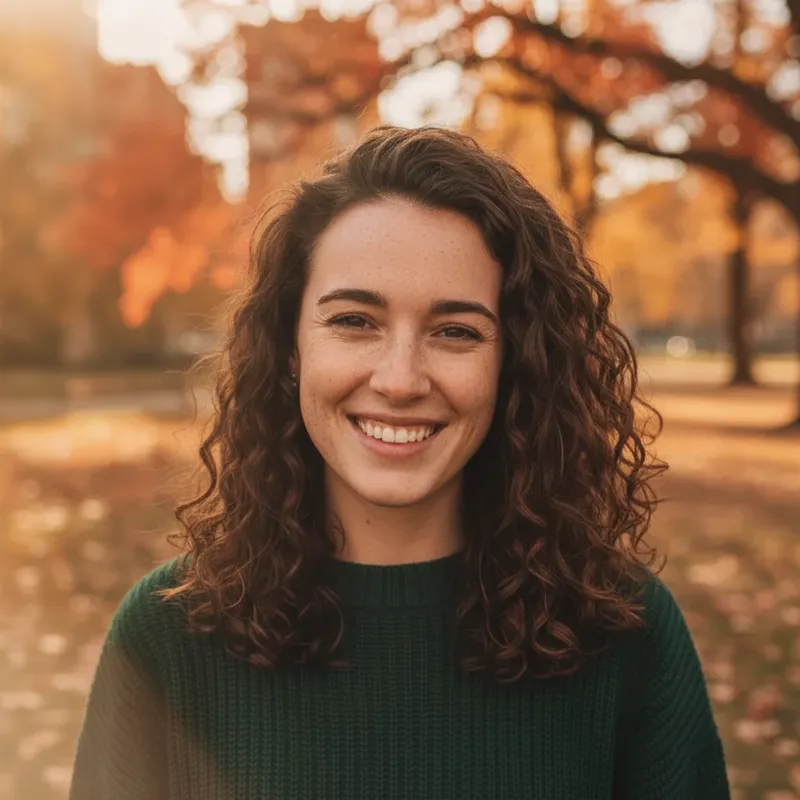
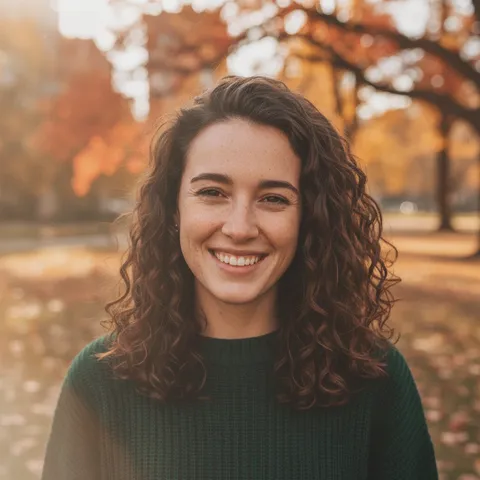
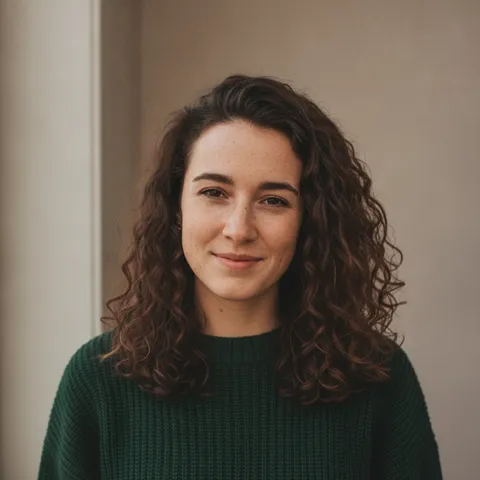
More one-tap edits in the AI photo editorRun once on this site’s editor on 2026-11-19 with one fictional, AI-generated portrait. The result is the first image on this page; the face scored 0.93 against the input.
Light only: golden-hour backlight, everything else kept
Keep my face, freckles, expression, curly hair, sweater and the park background exactly the same. Change only the lighting: soft golden-hour backlight with a gentle warm rim on my hair. No text, logos or watermarks.
Light only: window light on a plain wall (no result)
What “Prompt AI Editz” means (a different spelling)We started this one once on 2026-11-19 on a fictional man’s portrait. The run timed out after 3 minutes with no image, so we have no result to show and do not know how it looks.
Light only: soft window light from the left
Keep my face, expression, hair, grey T-shirt and the plain wall exactly the same. Change only the lighting: soft warm window light from the left with a gentle shadow on the right side. No text, logos or watermarks.
Background only: a quiet cafe (not run)
We did not run this one. Use a clear photo you have the right to use.
Background only: a quiet cafe, softly blurred
Keep my face, hair, clothes and the light on my face exactly the same. Change only the background to a quiet cafe interior with wooden tables, softly blurred. No text, logos or watermarks.
Outfit only: a cream turtleneck (not run)
Another prompt page: the whale-tail photo promptWe did not run this one. Outfit edits can rebuild a face when the keep line is missing, as Recraft warns, so the keep line stays in.
Outfit only: a cream turtleneck
Keep my face, hair, expression and the background exactly the same. Change only my top to a plain cream turtleneck sweater that fits naturally. No text, logos or watermarks.
Pricing on this site
Credit packs or a monthly plan.
Credits come in one-time packs ($4.99 for 50 credits, $9.99 for 120 credits, $19.99 for 300 credits); each image costs 10 credits. Or pick a plan from $9.90 a month (500 credits), cancel anytime.
Refund policy- Basic · $9.90/month500 credits a month · about 50 images · $0.20 per image
- Pro · $19.90/month1500 credits a month · about 150 images · $0.13 per image
Billed every month and renews automatically. Cancel anytime in Settings; you keep the plan until the end of the month you paid for. Each month's credits are for that month; unused ones expire.
Refund policyPhoto tools on this site
Images only: edits, restyles and effects for your own photo
- Trend promptsOpen
 Yes Yes I Love You templateOpen
- Tiny Desk AIOpen
- Kirk Cousins AI videoOpen
 Teto Fortnite AI promptsOpen
 GTA 6 loading screenOpen
 GTA 6 ChatGPT promptOpen
 Vikas Editor videoOpen
 GTA 6 filterOpen
 GTA 6 AIOpen
 ChatGPT photo editing promptOpen
- GTA filterOpen
- Prompt AyeshaOpen
 Ye Technical AI promptsOpen
 Whaletail AI promptOpen
 ChatGPT sweater promptOpen
 AI sweater trendOpen
 Miss promptOpen
- AI photo effectsOpen
- All AI photo effectsOpen
FAQ
Questions, answered
What are prompt AI edits?
Instructions in plain language that tell an image model how to change a photo you upload. The phrase is also used for editing a prompt with AI, which this page does not cover. Our search tool is not Google, so we cannot say which meaning most people searching for it want.
How do I write a prompt for AI photo editing?
Write one change and one keep line. Say what changes (the light, the background or the outfit), list what must stay (face, expression, hair, clothes), and end with no text, logos or watermarks. Recraft, Aiarty and Luma describe the same shape. Keep it to one change per prompt; ours were about 200 of the 400 characters allowed here.
Can I use AI photo editing prompts copy and paste from other sites?
You can paste any text into the editor here and it runs on your photo, within the request check, which refuses face-swap and similar wording. We have not tested other sites’ prompts and we copied none of them. Results depend on the photo and the tool, so run one and look before you rely on it.
Does a vague prompt ruin the face?
Not in our one run. “Make it look better and more cinematic.” kept the face (score 0.92 against the input) but made the whole photo about 18% darker with a heavier grade, which we did not ask for. Recraft warns that vague words can make the model rewrite the whole image. One run on one fictional portrait proves nothing general.
Are ChatGPT and Gemini photo editing prompts the same as these?
The shape is similar: say what to change and what to keep. Aiarty publishes Gemini prompts built that way. We did not run ChatGPT or Gemini, so we cannot say how their results compare with this editor’s. Our related page on copy-ready photo prompts covers ChatGPT- and Gemini-style lists.
Is it free here?
Partly: new accounts get 10 free credits after signing in, enough for 1 free image (once per account, valid for 7 days, while the day's new-account gifts last). Each image costs 10 credits; after that, from $0.13 per image on a monthly plan.
Can edit prompts swap faces or make a video here?
No. The editor takes one photo, so there is no second face to use, and its request check refuses face-swap and deepfake wording. It makes still images only.
Ready to try a prompt AI edit on your photo?
Upload one photo, paste a prompt or write the change, and download the result in about 37 seconds.
Edit a photo hereIndependent site. Not affiliated with or endorsed by Recraft, Aiarty, Luma, CapCut, getimg.ai, INSIDEA or any site called “Prompt AI Edits” or “Prompt AI Editz”. Tool names are used only to describe what their own pages state, read on 2026-11-19; prices, limits and availability may change. All sample people are AI-generated and fictional.