Canva headshot generator alternative: what Canva’s tool states, and one photo edited here
This site is a Canva headshot generator alternative for one job, a cleaner headshot backdrop on one photo of you: its one-tap edit returns one 1024 × 1024 image in about 37 seconds for 10 credits. Free with sign-up: 10 credits = 1 image, then from $0.13 per image on a monthly plan, while Canva’s page states two free credits and then a 24-hour wait.
 Your photo
Style changes (cartoon, 3D, anime) are not reliable yet. If the result looks unchanged, try again or describe the change more specifically.
One-tap edits
- One photo in, one image out
- Face kept in both of our one-tap runs; not guaranteed
- Free with sign-up: 10 credits = 1 image
- free on Canva’s AI headshot page, then a 24-hour wait (Canva, read 2026-11-19)
- 2 credits
- photos to upload, headshots per run and output size on Canva’s page
- Not stated
- typical edit time here
- 37 s
- of our one-tap Professional headshot runs kept the face
- 2 of 2
What Canva’s AI headshot generator is, as Canva states it
Canva’s feature page says you upload an image, choose a gender identity (female, male or non-binary) and the AI adds studio-style lighting and a professional background. It lists five steps: open Canva, open the AI headshot generator app, generate, refine, then download and share; the details behind the steps were collapsed and did not open for us. Its advice for a realistic result is a well-lit, head-and-shoulders photo, facing the camera, a neutral expression and nothing covering the face. These are Canva’s statements, read on 2026-11-19; we did not run the tool.
- Upload one picture, pick a gender identity, generate
- Refine and download inside Canva’s editor
- Number of headshots per run and output size: not stated
Where the Canva headshot generator runs: an app in the editor
Canva’s page does not name the app that does the work. Canva’s apps marketplace lists several headshot apps made by other developers; we opened one, ProfilePhoto, listed under Imagineers Studio Inc., with “10+ styles”, the permission to read and change design content and to access media you uploaded to Canva, and the line that it is free to use with any Canva plan. We could not confirm that ProfilePhoto is the app behind the feature page. The listing also says using an app means accepting that app’s own terms, which we did not read.
- The feature page names no app; the marketplace lists several
- ProfilePhoto: developer Imagineers Studio Inc., “10+ styles”
- App permissions: read and change design content, access uploaded media
A Canva headshot generator alternative in one tap: what we ran
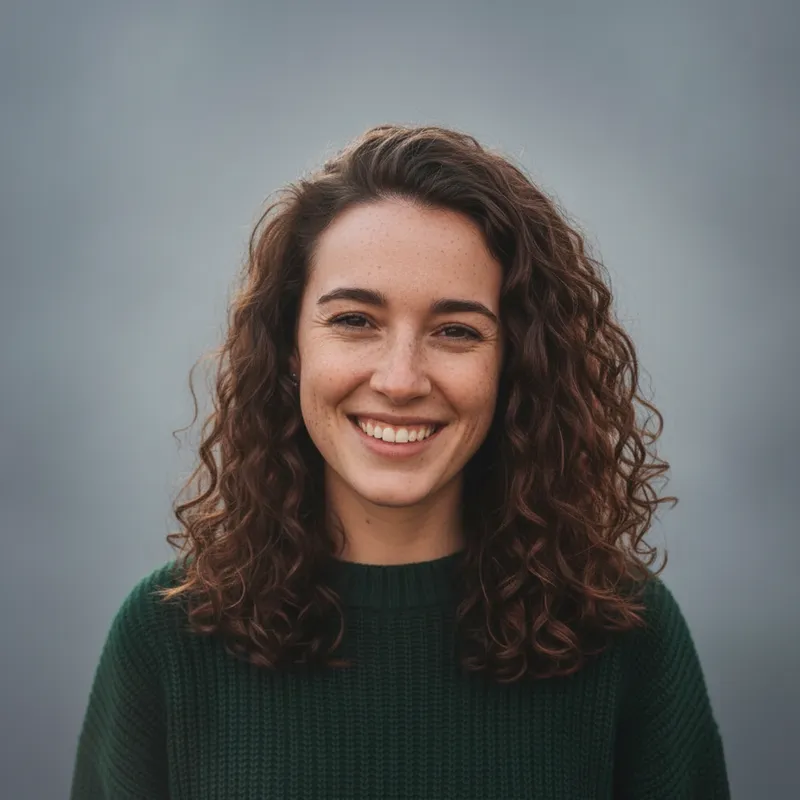
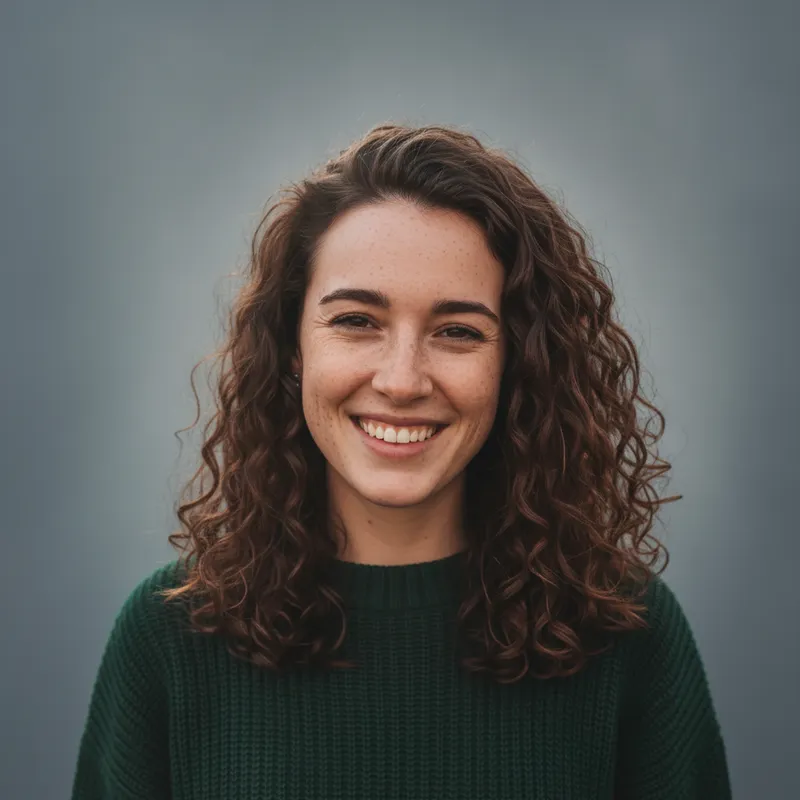
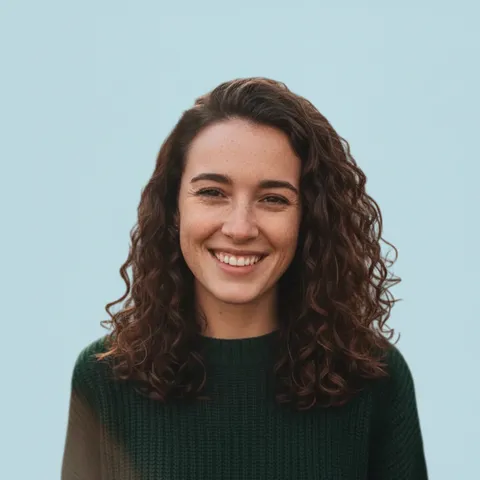
This site’s editor has a one-tap “Professional headshot” edit: a smooth grey-blue background with a soft gradient, soft even light on the face and a head-and-shoulders crop, keeping clothing, hairstyle and expression. On 2026-11-19 we ran it twice on the same fictional AI-generated portrait, 11 seconds and 69 seconds. Both results show the same woman with the same freckles, curls and sweater; the second background is a little darker. That is two runs on one face, not a rate, and we did not run Canva’s tool, so we say nothing about which looks better.
Where this site is not a Canva headshot generator
This site edits one photo, with no step that asks for a gender identity and no training on you, and it returns one 1024 × 1024 image per run, not a set. You can type your own request (up to 400 characters), but a bigger makeover is riskier: on our professional headshots page a written new-blazer-and-studio edit changed the face in 2 of 2 results that returned an image. It is not part of a design tool: you download the picture and place it yourself, so if you want Canva’s templates around the photo, Canva’s own tool is the natural place.
- One photo, one image; no set of varied headshots
- No gender-identity question; you describe the change in words
- Check every result against your photo
Canva headshot generator: what Canva states, and what we could not confirm
Canva’s AI headshot generator page (Canva’s own words)
- You upload an image, select a gender identity (female, male or non-binary), and the AI adds lighting and a professional background. The page calls it a way to update a LinkedIn profile or resume, and lists five steps: open Canva (app or browser, template or blank layout), access the AI headshot generator app, generate, refine, download and share.Source: Canva, AI headshot generator page (vendor claim) ·
- Its FAQ says the generator “offers two free credits”; after you use both you wait 24 hours before you can generate more for free, and extra credits are bought through a link at the bottom of the app page in the online editor. The price of extra credits is not shown.Source: Canva, AI headshot generator page (vendor claim) ·
- Photo advice: a clear, well-lit photo, face centered, nothing covering it (hats, scarves, sunglasses), a neutral expression facing the camera, head and shoulders; the Background Remover can clear distractions. It says “your picture” and “any selfie” and does not give a number of photos, a number of results per run, or an output size.Source: Canva, AI headshot generator page (vendor claim) ·
Canva’s plans, AI terms and the app listing
- US prices on the monthly toggle: Free US$0; Pro US$18 a month, shown as US$9 during a first-3-months 50% offer; Business US$25, shown as US$12.50. A footnote says Standard, Premium and Ultra AI tools share a monthly AI allowance that varies by plan, and an AI Pass add-on exists. The page does not say whether the headshot app uses that allowance.Source: Canva, pricing page (US) ·
- Effective 26 June 2026: you keep ownership of what you upload and, as between you and Canva, you own the output, except output that modifies Canva library content; outputs may not be unique, and other users may get similar ones. Canva may set AI usage limits and calls them “operational controls and not fixed entitlements”. Input may be shared with technology partners, and your privacy settings control whether your data improves its AI. It forbids misleading anyone that AI content is human-made and removing provenance tags such as C2PA. These terms are for Canva’s own AI products; the page does not say the headshot app is one of them.Source: Canva, AI Product Terms ·
- ProfilePhoto, a marketplace app: “Create AI-enhanced professional profile photos”, “10+ styles”, developer Imagineers Studio Inc., permissions to read and change design content and to access uploaded media, “free to use with any Canva plan”, reviewed against Canva’s security requirements, and subject to its own terms and privacy policy.Source: Canva Apps marketplace, ProfilePhoto listing (vendor claim) ·
Who ranks for “canva headshot generator”
- The top five results in a web search (not Google) were a vendor page titled as a Canva headshot generator alternative, Canva’s Korean and English feature pages, an edgeone.ai blog and an avclabs.com blog. We opened only Canva’s own pages. Several other pages in the results give Canva prices and credit rules that differ from Canva’s pages, so we quote none of them.Source: Web search, “canva headshot generator” ·
Not confirmed
- Which app powers Canva’s feature page, how many photos it takes, how many headshots a run returns, credits per run, the output size, the price of extra credits, how long photos are kept, and whether Canva Pro changes any of it.Source: Canva ·
- ProfilePhoto’s own terms, privacy policy and prices: the listing links to them and we did not read them.Source: Canva Apps marketplace ·
- How Canva’s headshots look next to ours: we did not run Canva’s tool, so we do not rank quality. The trend figure (+110, rising) comes from the daily pick and was not verified.Source: Daily keyword pick, 2026-11-19 ·
Side by side
Canva’s headshot tools and this site, as stated
| Tool | Photos you upload | What you get | Price as stated | Limits as stated |
|---|---|---|---|---|
| Canva AI headshot generator (feature page) | “Your picture”; a count is not stated | AI headshot with studio lighting and a professional background; count and size not stated | Two free credits; extra credits sold in the app, price not stated | 24-hour wait after both credits are used |
| ProfilePhoto (Canva marketplace app) | Not stated on the listing | “10+ styles” | Listing: free to use with any Canva plan; the app’s own credit prices not read | Reads and changes design content, accesses uploaded media |
| This site | One photo, no training | One edited 1024 × 1024 image per run | 10 credits per image, from $0.13 on a monthly plan | About 37 seconds; sign-in needed |
When to use which
Which one for which job
You want a try inside a Canva design: use Canva’s tool
Canva’s page states two free credits, then a 24-hour wait, and the result stays in Canva’s editor beside its templates and the Background Remover. We did not run it.
You want a cleaner backdrop on one photo of you: edit it here
Upload the photo and tap “Professional headshot”, or write one change (up to 400 characters). It takes about 37 seconds and 10 credits a run, and returns one 1024 × 1024 image.
Check the face against your photo
Look at the eyes, nose, smile and hair. Both of our one-tap runs kept the face; a bigger makeover did not always, so if it looks like someone else, do not use it.
You want a set of varied headshots
This site returns one image per run and does not learn your face. The dedicated services that take several photos are compared on our professional headshots page.
Prompts
Headshot prompts to paste into this site’s editor
These four prompts are for this site’s photo editor and change the background, light or one colour of one photo. We ran the one-tap Professional headshot edit (not these pasted texts) twice on 2026-11-19 on one fictional AI-generated portrait, and both kept the face; none of the four texts below was run, so check each result. They name no brand or product, and we have not tested them in other tools, Canva included. You can also type your own request in the editor, up to 400 characters.
Grey-blue backdrop, written version (not run)
What went wrong when we also changed clothes: AI professional headshotsWe ran the editor’s one-tap Professional headshot twice on 2026-11-19 and both results kept the face. This pasted text is a written variant of it, which we did not run, so check the result.
Grey-blue backdrop, soft light (written version of the one-tap edit)
Turn this into a clean professional headshot: a smooth neutral grey-blue background with a gentle gradient and soft even light on my face, in a head-and-shoulders crop. Keep my face, hairstyle, clothing and expression exactly as they are. No text, logos or watermarks.
Plain white background (not run)
More one-tap edits: AI photo editorNot run. It says front-facing on purpose: a wording with “profile photo” in it came back as a side view on our professional headshots page.
Plain white background, facing the camera
Keep my face, hair, clothes, smile and front-facing pose exactly the same, looking straight at the camera. Replace only the background with a clean plain white seamless backdrop and add soft even light on my face. Change nothing else. No text, logos or watermarks.
Softer light, calmer background (not run)
Compare another editor: Pixlr alternativeNot run. It changes light and background only, the kind of edit that kept the face in our runs.
Softer light, calmer background
Keep my face, hair, clothes and expression exactly the same. Blur and simplify the background into a quiet, out-of-focus neutral tone, and even out the light on my face so there are no harsh shadows or bright patches. Keep natural skin texture. No text, logos or watermarks.
One change only: a darker top (not run)
A cartoon profile picture instead: avatar creatorNot run. One small change at a time is the safest way to keep the face; a similar colour-only edit worked on an earlier page of ours.
One change only: a darker top
Keep my face, hair and the background exactly the same. Change only the colour of my top to a plain dark navy, with the same shape and texture, and leave everything else in the photo unchanged. No text, logos or watermarks.
Pricing on this site
Credit packs or a monthly plan.
Credits come in one-time packs ($4.99 for 50 credits, $9.99 for 120 credits, $19.99 for 300 credits); each image costs 10 credits. Or pick a plan from $9.90 a month (500 credits), cancel anytime. Canva’s plans and credits are billed separately by Canva and are listed in the sources above.
Refund policy- Basic · $9.90/month500 credits a month · about 50 images · $0.20 per image
- Pro · $19.90/month1500 credits a month · about 150 images · $0.13 per image
Billed every month and renews automatically. Cancel anytime in Settings; you keep the plan until the end of the month you paid for. Each month's credits are for that month; unused ones expire.
Refund policyPhoto tools on this site
Images from your own photo: edits, restyles and effects
- Alternatives and AI toolsOpen
 MiniMax H3 ImageOpen
- LongCat VideoOpen
 Adobe Firefly alternativeOpen
 EasyFaceSwap alternativeOpen
 Vidwud face swap alternativeOpen
 MeiGen AI alternativeOpen
 SnapGen AI alternativeOpen
- QuickAIHeadshots alternativeOpen
 Betterpic alternativeOpen
- Everygen alternativeOpen
- PhotoCraft alternativeOpen
- Free clipping AIOpen
- What is KixyOpen
- OpenShorts alternativeOpen
- Snazo alternativeOpen
- Vikas edit alternativeOpen
- Seedream 5.5Open
- PromptSeen alternativeOpen
- Prompt AI EditzOpen
- Ronytica alternativeOpen
 Pixlr alternativeOpen
 Free AI image generator, no restrictionsOpen
- MiniMax H3 Image character swapOpen
- MiniMax H3 Image ComfyUI workflowsOpen
- SeedanceOpen
- LTX 2.5Open
- LongCat Video Avatar 1.6Open
- PAN2Open
- FastFrames LOpen
- Swagga AI websiteOpen
- Wan 2.2 and Wan 2.1Open
 M4 Editor alternativeOpen
 Harish Edits alternativeOpen
- AI photo effectsOpen
- All AI photo effectsOpen
FAQ
Questions, answered
Is the Canva headshot generator free?
In part, as Canva’s own page states it: two free credits, then a 24-hour wait before you can generate more for free, and extra credits are sold in the app. The price of extra credits is not shown on that page. Other sites quote different rules, so check Canva’s page on the day.
Does the Canva AI headshot generator need Canva Pro?
Canva’s feature page does not say it does, and the marketplace listing we opened says its app is free to use with any Canva plan. Canva’s pricing page lists a shared monthly AI allowance on paid plans but does not mention the headshot app. Third-party guides disagree, so we cannot rule out a plan-based change.
How many photos does the Canva headshot generator take, and what size are the results?
Canva’s page says “your picture” and “any selfie”, which suggests one, but it gives no number, no count of results per run and no output size. We could not confirm any of them.
Is this site a Canva headshot generator alternative?
For one job, yes: it edits one photo of you into a cleaner backdrop with a one-tap Professional headshot, returning one 1024 × 1024 image in about 37 seconds. It is not a set generator, it does not ask for a gender identity, and it is not affiliated with Canva.
Is there a free Canva headshot generator alternative?
On this site, Partly: new accounts get 10 free credits after signing in, enough for 1 free image (once per account, valid for 7 days, while the day's new-account gifts last). Each image costs 10 credits, from $0.13 per image on a monthly plan. Dedicated services and their prices are compared on our professional headshots page.
Will the headshot look like me?
In our two one-tap runs on one fictional portrait the face stayed the same. We cannot promise it for every photo: a bigger makeover on our professional headshots page changed the person in 2 of 2 results. Check each picture against your photo, and do not use one that looks like someone else.
Can I use an AI headshot on LinkedIn or commercially?
Canva’s AI terms say you may use your output for any lawful purpose, with its own limits, but those terms are for Canva’s AI products and we do not know whether the headshot app is covered. We did not read LinkedIn’s or an employer’s rules, so check the place you will post it. This is not legal advice.
Can I make a headshot like the Canva AI headshot generator on this site?
Yes, for one photo of yourself: upload it, tap Professional headshot, and you get one 1024 × 1024 image with a cleaner backdrop in about 37 seconds, 10 credits per image. It is not Canva and not affiliated with it, and it does not return a set of headshots in one run.
Want a cleaner backdrop for your own photo?
Upload one photo of yourself, tap Professional headshot, and download the result in about 37 seconds.
Edit a photo hereIndependent site. Not affiliated with or endorsed by Canva, Imagineers Studio, ProfilePhoto or any other tool named here. They are named only to describe what people search for and compare. Facts about those tools come from their own pages, read on 2026-11-19; prices, limits and availability may change, and we did not run Canva’s tool. Only upload photos of yourself or people who agreed; this site does not make real-person lookalikes and its photo samples are AI-generated, fictional people. This is not legal advice.