Pixlr alternative: what Pixlr is, what it costs, and an editor where you type the change
A Pixlr alternative depends on your use: Pixlr is a browser editor with layers, manual tools and AI credits, while this site is not Pixlr and does one job, editing one photo from a written request in about 37 seconds for 10 credits. Free with sign-up: 10 credits = 1 image, then from $0.13 per image on a monthly plan.
 Your photo
Style changes (cartoon, 3D, anime) are not reliable yet. If the result looks unchanged, try again or describe the change more specifically.
One-tap edits
- Not affiliated with Pixlr
- One photo, one written edit, no layers
- Free with sign-up: 10 credits = 1 image
- cheapest Pixlr plan (Plus, billed yearly) as listed on pixlr.com, read 2026-11-19
- $1.99 / mo
- for a photo edit here
- ≈ 37 s
- per image edited here
- 10 credits
- edits we ran here fully worked; the third only in part, and we say so
- 2 of 3
Which Pixlr alternative is right for you?
Pixlr, by its own pages, is an editor you drive yourself: layers, selection and healing tools, masks and a set of AI tools, in the browser. This site works the other way round. You upload one photo, type what to change (up to 400 characters) or tap a one-tap edit, and get one edited image back, 1024 × 1024, in about 37 seconds. If you need layers, brushes, exact selections or large exports, you want a real editor, and the table and list below name three. If you mostly want to swap a background, tidy a room, fix the light or change one colour in a single photo without learning tools, a typed request may be enough.
- Pixlr: layers, manual tools, AI credits, browser, paid plans
- Here: one photo, one written request, one image back
- Neither is the other: this site is not Pixlr
Before: Pixlr: you drive layers, masks, brushes and AI tools
This site: you type the change, one 1024 × 1024 image back
Pixlr-style job 1: swap the background
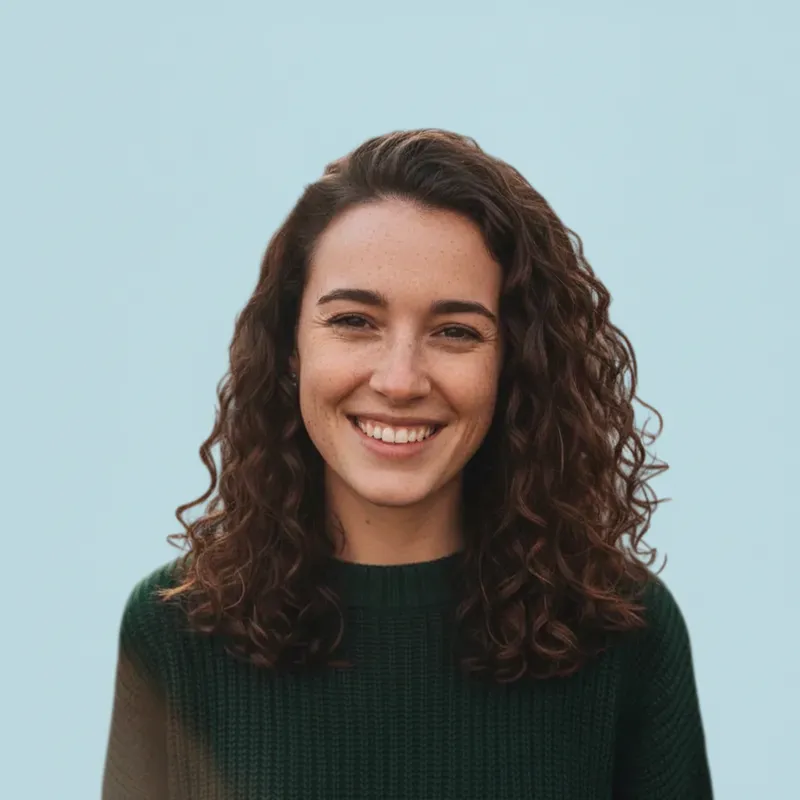
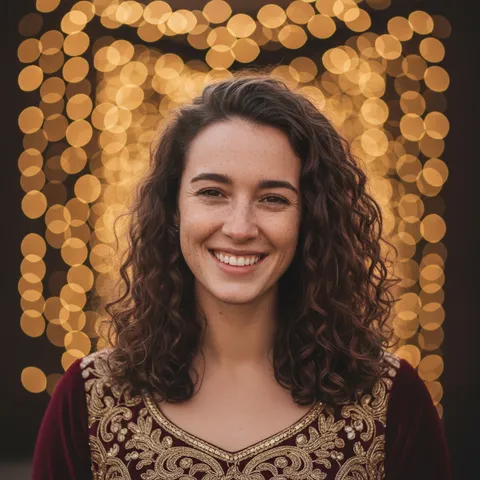
Pixlr lists a Background Remover and a Cutout and Mask tool. Here we asked the editor in words to cut a fictional portrait out and put her on a plain pale blue background. It took 37 seconds or so, and it worked: face, curly hair and sweater stayed the same, and the hair edge came out clean with no leftover leaves. That is one run on one photo, not a test of every hairstyle.
- Prompt is in the list below, ready to copy
- Result is 1024 × 1024, not a layered file
- No manual mask to fix: if an edge is wrong you run it again
Pixlr-style job 2: remove objects (this one only partly worked)
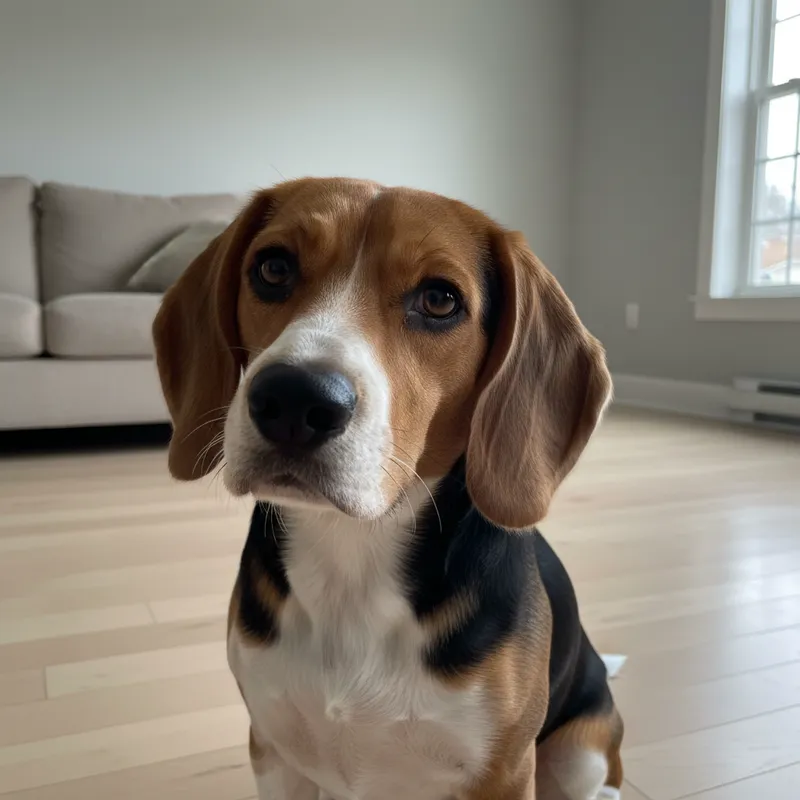
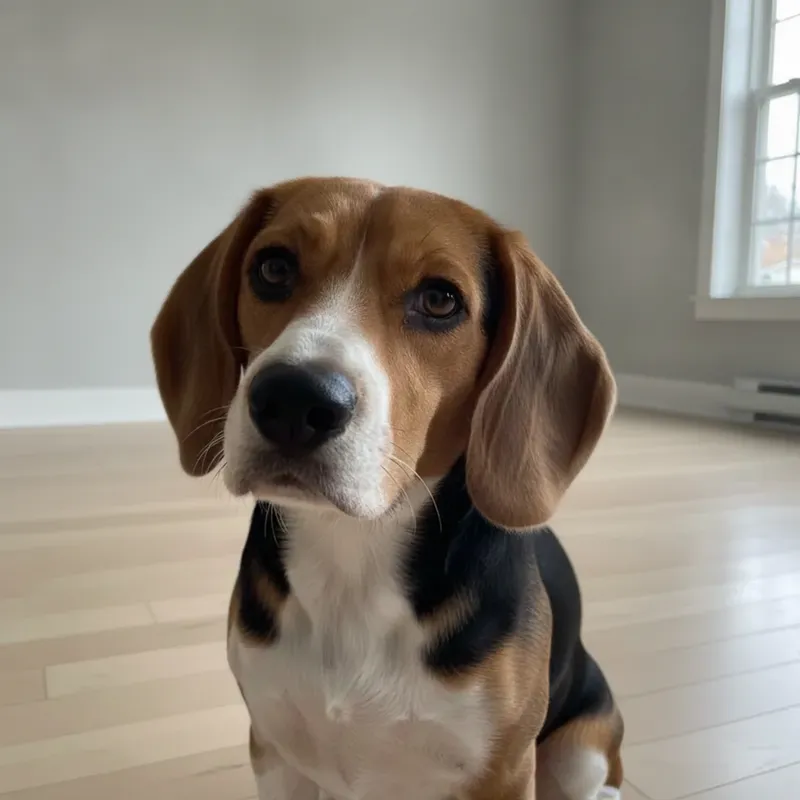
Pixlr lists an Object Remover and Generative Fill. We asked this editor to take the sofa, the window and the radiator out of a room behind a beagle. The sofa went and the wall came out plain, but the window and the radiator stayed, so the request was only partly followed. The dog was unchanged. For removing one named thing from a busy photo, ask for one thing at a time and check the result; a tool with a brush, where you paint over exactly what to remove, gives you more control.
- Worked: sofa removed, dog unchanged
- Did not work: window and radiator still there
- Name one object per request for the best chance
Pixlr-style job 3: change one colour
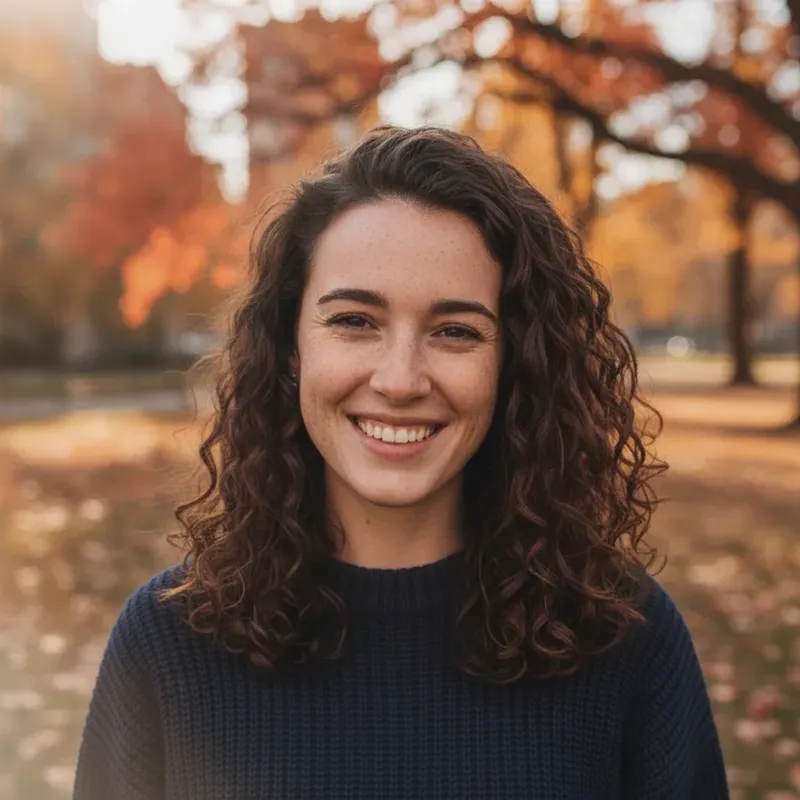
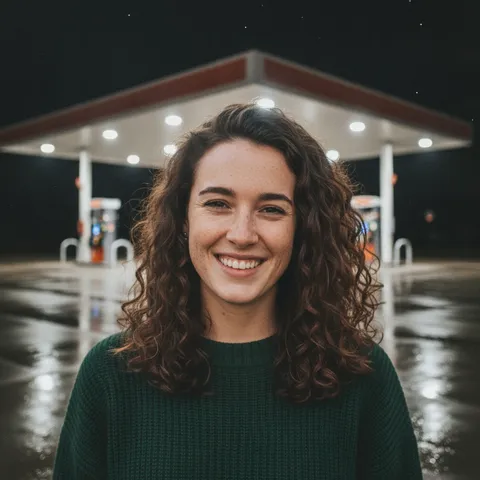
Pixlr describes Generative Fill as adding, removing or modifying elements with text prompts, at 1 AI credit a prompt. Here we typed one local change: turn the green sweater navy and leave everything else alone. The knit texture, the face, the hair and the park behind her all stayed, and only the sweater colour changed. Each run costs 10 credits on this site.
- Say what must stay: face, hair, background
- Say the one thing to change
- No text, logos or watermarks in the request
Where Pixlr does things this site does not
By Pixlr’s own pages, its editors have layers with blend modes and masks, selection, heal, clone and liquify tools, crop presets up to Ultra HD (3840x2160) and an upscaler (Super Scale) that it says reaches about 25 megapixels. It also lists an AI video generator, a text-to-image generator, face swap and a mobile app. This site has none of that: one photo in, one 1024 × 1024 image out, no layers, no brush, no video, no text-to-image, no upscaling and no second photo. On price per AI edit, Pixlr looks cheaper too (see the pricing note below).
- Layers, masks and manual tools: Pixlr, not here
- Large exports and upscaling: Pixlr, not here (1024 × 1024 here)
- Video and text-to-image: Pixlr lists them, not here
Before: Pixlr, per its pages: layers, manual tools, Super Scale, video
This site: one photo, one request, 1024 × 1024
What Pixlr is, and other Pixlr alternative options we read
Pixlr: what it is, per its own pages
- Pixlr’s home page calls itself an online photo editing and AI suite: AI photo editor, image generator, video maker, face swap and collage maker, working in the browser without a download. Products listed are Pixlr Express, Pixlr Editor, Community and Pixlr Agent, with mobile and desktop links. The footer reads “Pixlr Pte Ltd © 2026”.Source: pixlr.com (vendor claim) ·
- Pixlr Editor is described as an advanced online photo editor with a layers panel (blend modes, lock, visibility), selection, crop, liquify, heal, clone and other manual tools, masks and AI features such as AI Auto Mask and generative fill. Files save as .PXZ and export as PNG from the quick-export menu; the page lists no other export format and states no usage limits.Source: pixlr.com/editor (vendor claim) ·
- Pixlr Express is described as a free AI-powered editor with layers, masks and tools including remove background, remove object, super scale, super sharp, remove noise, face swap and generative fill. Actions show credit costs such as 1c for super sharp and 2c for a swap. Super scale tops out around 25 megapixels (5000x5000 px), and crop presets reach Ultra HD (3840x2160).Source: pixlr.com/express (vendor claim) ·
- Generative Fill is described as adding, removing or modifying elements with text prompts, at 1 AI credit per prompt, up to 5000x5000 pixels, in under 10 seconds. Its FAQ answers “Is Pixlr AI Generative Fill free?” with “Unfortunately, No.”Source: pixlr.com/ai/ai-generative-fill (vendor claim) ·
- The image generator page says a new user can generate 20 images using 20 credits, and a free trial gives 250 credits free of charge (the page does not say how long the trial lasts).Source: pixlr.com/image-generator (vendor claim) ·
Pixlr: plans and prices, as listed
- Plus: $2.49 a month, or $1.99 a month on yearly billing; 80 AI credits a month; ad-free, unlimited saves. Pixlr’s own estimate for Plus is about 80 fast AI edits a month.Source: pixlr.com/pricing (vendor claim) ·
- Premium: $9.99 a month, or $7.99 a month on yearly billing; 1,000 AI credits a month; all image, video and audio models, 4 concurrent AI generations, private mode. Pixlr’s own estimate is about 1,000 fast AI edits a month.Source: pixlr.com/pricing (vendor claim) ·
- Ultra: $24.99 a month, or $19.99 on yearly billing, with up to 10,000 credits, a priority queue and extended high-res exports; Ultra MAX is listed at $49.99 or $39.99. Credits top up at each renewal, and subscription credits reset to 0 if you cancel. The page shows “$” without naming the currency.Source: pixlr.com/pricing (vendor claim) ·
- The home page FAQ says the free version works “without requiring an account or any charges”, while another answer tells you to sign up for a free account to get started. It says Plus and Premium give an ad-free experience.Source: pixlr.com FAQ (vendor claim) ·
Pixlr’s history, from a secondary source
- Wikipedia says Pixlr was founded in 2008, that Autodesk announced the acquisition of the Pixlr suite on 19 July 2011, that it was acquired from Autodesk in 2017, and that Pixlr, Designs.ai and Vectr were combined as Pixlr Group in November 2023, with Pixlr Pte. Ltd. as developer. The article names versions Pixlr X, E and M from 2019.Source: Wikipedia (secondary) ·
Other Pixlr alternative options, as they state themselves
- Photopea calls itself a free online photo editor that works in the browser. It says files are not uploaded (it runs on your device), opens and saves PSD, lists layers, masks, smart objects and adjustment layers, and offers one-click background removal.Source: Photopea (vendor claim) ·
- GIMP is a cross-platform image editor for GNU/Linux, macOS and Windows and describes itself as free software. Its news item “GIMP 3.2.8 Released” is dated 2026-11-02. It lists photo retouching, restoration and composites, plus scripting and plug-ins.Source: GIMP (vendor claim) ·
- Photoroom calls itself an AI visual editor for e-commerce, turning product photos into listing images, with a background remover, working on web, mobile and API. Its pricing page lists paid plans by monthly exports (1,000, 3,000 and 10,000) and AI credits, with exports up to 2K and 4K only on its top plan.Source: Photoroom (vendor claim) ·
Not confirmed
- Pixlr’s free-plan limits: how many saves a day, whether free AI credits recur, whether the free version shows ads (the page only implies it), and whether you must log in to open the editor. We found no official page that states them, and we do not repeat figures from third-party review sites.Source: pixlr.com ·
- Who owns Pixlr today beyond the footer’s “Pixlr Pte Ltd”, how the 2019 names Pixlr X and Pixlr E map to today’s Pixlr Express and Pixlr Editor, and what Pixlr Agent does. The pages we read do not say.Source: pixlr.com and Wikipedia ·
- Photopea’s ads and any paid plan, GIMP’s licence text on its home page, and Photoroom’s price amounts and free-plan limits: not stated on the pages we read.Source: Photopea, GIMP, Photoroom ·
Side by side
Pixlr alternative: Pixlr and this site side by side
| Row | Pixlr (as it states) | This site |
|---|---|---|
| What it is | A browser editor with layers, manual tools and AI tools; also a mobile app and a desktop link | A photo editor where you type the change; one photo in, one image out |
| Layers and manual tools | Yes: layers, masks, selection, heal, clone, liquify, text, shapes | No layers, no brush, no manual selection |
| Background removal and object removal | Background Remover, Object Remover, Cutout and Mask, Generative Fill | By written request or a one-tap edit; our removal run only partly worked |
| Output size | Crop presets up to 3840x2160; Super Scale up to about 25 megapixels | 1024 × 1024; no upscaling |
| Video and text-to-image | Lists both | Neither; a photo is always the input |
| Price | Plans from $1.99 a month on yearly billing (Plus); free version stated | 10 credits per image, from $0.13 on a monthly plan |
| Rough price per AI edit (our arithmetic) | About $0.03 on Plus ($2.49 ÷ about 80 edits) and about $0.01 on Premium ($9.99 ÷ about 1,000), if Pixlr’s estimates hold | $0.13 at best, so Pixlr looks cheaper per AI edit |
| Free | Free version stated; limits not confirmed; 20 images for 20 credits for new users | Free with sign-up: 10 credits = 1 image |
| Sign-in | A free account is mentioned; whether the editor needs login is not confirmed | Sign-in required before you generate |
How to do it here
Try the typed-request alternative to Pixlr in three steps
Upload one photo
Use the editor at the top. Pick one clear photo you took or have the right to use, with the subject in view.
Tap an edit or type the change
One-tap edits include remove background clutter, plain studio background, fix the lighting and sharpen and clean up. Or write your own request, up to 400 characters. Say what must stay and what changes, and ask for no text or logos.
Check the result and download
About 37 seconds per image, 1024 × 1024. Check the edges and any object you asked to remove, then run again with one change if needed. If it fails, the 10 credits come back.
Prompts
Pixlr-style edits as written requests for this site’s editor
Each prompt below was run once on this site’s editor on 2026-11-19 with the site’s own fictional AI-generated photos. Two worked fully and one only in part, as the notes say. They name no brand or product, and we have not tested them in other tools. Results vary with the photo.
Background swap: plain blue behind a portrait
More one-tap edits in the AI photo editorRun once on this site’s editor on 2026-11-19 with one fictional AI-generated portrait. It worked: the result is the first sample on this page.
Cut me out on a plain blue background
Keep my face, hair and clothes exactly the same. Cut me out cleanly and replace the whole background with a plain, flat, solid pale blue, with crisp natural edges around my curly hair and no leftover trees or leaves. No text, logos or watermarks.
Object removal: clear the room behind a dog
Repair or colorize an old family photoRun once on 2026-11-19 with one fictional AI-generated pet photo. It worked only in part: the sofa went, the window and the radiator stayed.
Remove the furniture behind the dog
Keep the dog exactly the same: face, fur and pose. Remove the sofa, the window and the radiator from the background and fill the room with a plain empty light wall and the same wooden floor. No text, logos or watermarks.
Local change: recolour one piece of clothing
Browse every photo effect on this siteRun once on 2026-11-19 with the same portrait. It worked: only the sweater colour changed.
Pricing on this site
Credit packs or a monthly plan.
Credits come in one-time packs ($4.99 for 50 credits, $9.99 for 120 credits, $19.99 for 300 credits); each image costs 10 credits. Or pick a plan from $9.90 a month (500 credits), cancel anytime. Pixlr’s own plans are listed in the table above, billed separately by Pixlr.
Refund policy- Basic · $9.90/month500 credits a month · about 50 images · $0.20 per image
- Pro · $19.90/month1500 credits a month · about 150 images · $0.13 per image
Billed every month and renews automatically. Cancel anytime in Settings; you keep the plan until the end of the month you paid for. Each month's credits are for that month; unused ones expire.
Refund policyPhoto tools on this site
Images only: edits, restyles and effects for your own photo
- Alternatives and AI toolsOpen
 MiniMax H3 ImageOpen
- LongCat VideoOpen
 Adobe Firefly alternativeOpen
 EasyFaceSwap alternativeOpen
 Vidwud face swap alternativeOpen
 MeiGen AI alternativeOpen
 SnapGen AI alternativeOpen
 Canva headshot generator alternativeOpen
- QuickAIHeadshots alternativeOpen
 Betterpic alternativeOpen
- Everygen alternativeOpen
- PhotoCraft alternativeOpen
- Free clipping AIOpen
- What is KixyOpen
- OpenShorts alternativeOpen
- Snazo alternativeOpen
- Vikas edit alternativeOpen
- Seedream 5.5Open
- PromptSeen alternativeOpen
- Prompt AI EditzOpen
- Ronytica alternativeOpen
 Free AI image generator, no restrictionsOpen
- MiniMax H3 Image character swapOpen
- MiniMax H3 Image ComfyUI workflowsOpen
- SeedanceOpen
- LTX 2.5Open
- LongCat Video Avatar 1.6Open
- PAN2Open
- FastFrames LOpen
- Swagga AI websiteOpen
- Wan 2.2 and Wan 2.1Open
 M4 Editor alternativeOpen
 Harish Edits alternativeOpen
- AI photo effectsOpen
- All AI photo effectsOpen
FAQ
Questions, answered
What is the best Pixlr alternative?
It depends on the job, and we do not rank. For layers and manual tools, Photopea (browser, says it is free) and GIMP (free software, desktop) describe themselves as full editors. For product photos and background removal, Photoroom is built for e-commerce. If you only want to change one photo by typing the change, this site edits one photo in about 37 seconds, 1024 × 1024, with no layers.
Is there a free Pixlr alternative?
Photopea says it is free and GIMP calls itself free software, both per their own pages. On this site, Partly: new accounts get 10 free credits after signing in, enough for 1 free image (once per account, valid for 7 days, while the day's new-account gifts last). Pixlr also states a free version, but we could not confirm its limits.
Is there a Pixlr alternative online, with no download?
Photopea works in the browser, according to its page, and Photoroom lists a web version. This site also runs in the browser. GIMP is a desktop program you install. Pixlr itself says it needs no download.
Is there a Pixlr alternative with no login?
Photopea’s page does not mention an account, and GIMP is a program on your computer, so neither seems to need one, though we did not test that. This site requires sign-in before you generate. For Pixlr, we could not confirm whether the editor needs a login: its FAQ says the free version works without an account, and another answer says to sign up for one.
What is a Pixlr X or Pixlr E alternative?
Wikipedia names Pixlr X and Pixlr E as 2019 versions, while pixlr.com now lists Pixlr Express and Pixlr Editor, and we could not confirm how they map. Pixlr Editor is described with layers and manual tools, so a layered editor such as Photopea or GIMP is the closest in kind; this site is closer to a typed-request edit than to either.
How much does Pixlr cost?
As listed on pixlr.com on 2026-11-19: Plus $2.49 a month ($1.99 a month yearly, 80 AI credits), Premium $9.99 ($7.99 yearly, 1,000 credits), Ultra $24.99 ($19.99 yearly, up to 10,000 credits). The page shows “$” without a currency, and the free version’s limits are not stated.
Is this site Pixlr, or affiliated with it?
No. This site is not Pixlr and not affiliated with Pixlr Pte Ltd, Photopea, GIMP or Photoroom. It does not copy their content, and it edits single photos from a written request.
Can I use layers, make a video or export bigger than 1024 here?
No. This site has no layers, makes images only, takes one photo and returns 1024 × 1024. It does not upscale. If you need those, use an editor such as the ones listed above.
Want to try a typed edit instead of layers?
Upload one photo, type the change, and download the result in about 37 seconds.
Edit a photo hereIndependent site. Not affiliated with or endorsed by Pixlr, Pixlr Pte Ltd, Photopea, GIMP or Photoroom. “Pixlr” is named only to describe what people search for; this site shows no Pixlr logo or screenshots. Facts about those products come from their own pages and Wikipedia, read on 2026-11-19, and are vendor statements we did not test; prices, limits and features may change.