AI fashion model generator: what this site does with your own photo
An AI fashion model generator invents a person from text and dresses them in your garment, but this site does neither: it restyles one photo of you as a fashion shot in about 37 seconds for 10 credits. Free with sign-up: 10 credits = 1 image, then from $0.13 per image on a monthly plan, and in our tests backdrop and light changes kept the face.
 Your photo
Style changes (cartoon, 3D, anime) are not reliable yet. If the result looks unchanged, try again or describe the change more specifically.
One-tap edits
- One photo in, one image out: no text-only models, no garment try-on
- Not affiliated with OpenArt
- Free with sign-up: 10 credits = 1 image
- for a photo edit here
- ≈ 37 s
- per image edited here
- 10 credits
- fashion prompts kept the face in our runs; the one that changed outfit and street did not
- 2 of 3
- free on sign-up, as OpenArt’s fashion page states, read 2026-11-19
- 40 credits
What a fashion model generator does, and what this site does
OpenArt’s page describes a text-and-photo tool: you upload a photo of a garment, describe the model, pose and setting, and it generates a model wearing it, keeping the garment’s “color, print and cut close to the original”, as the page puts it. This site cannot do that. It makes no person from text, takes one photo only so there is no garment photo to add, and runs one editing model. What it does: restyle your own photo as a fashion-style shot, with a new backdrop, light and sometimes outfit, and keep your face.
- Cannot: create a model from a text description
- Cannot: put a garment from a product photo on a model
- Can: restyle one photo of you, up to 400 characters of instructions
What worked: backdrop, light and colour
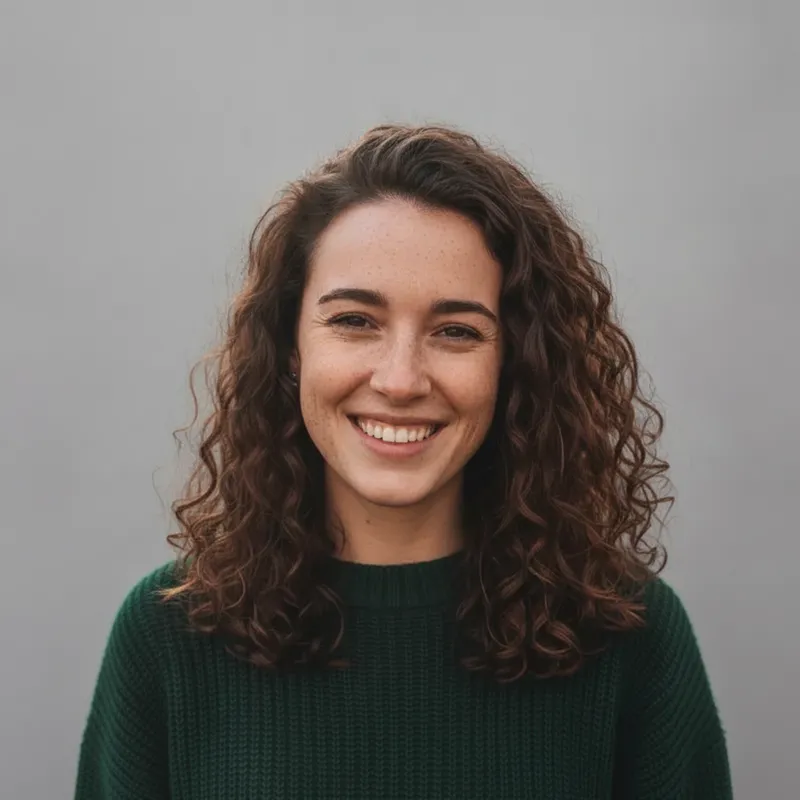
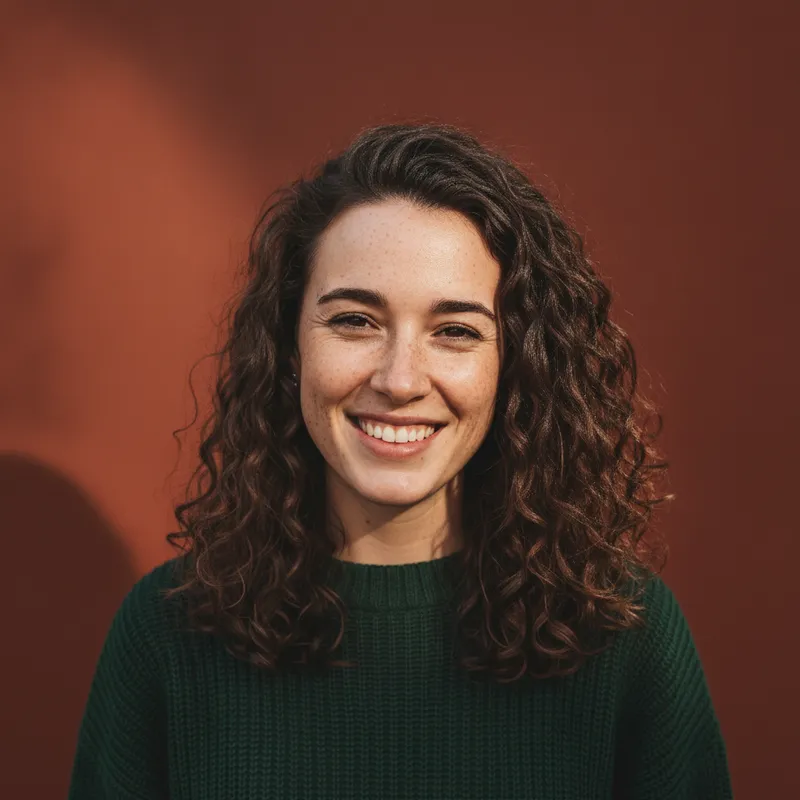
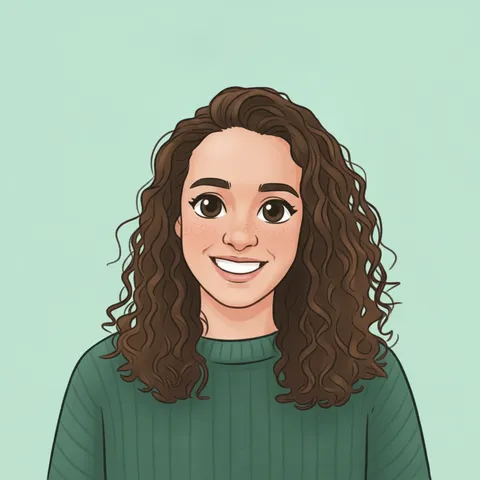
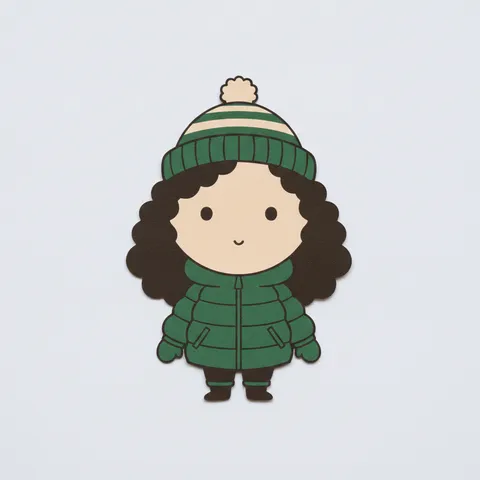
On 2026-11-19 we ran three fashion-style prompts on one fictional, AI-generated portrait. A plain light-grey catalogue backdrop with soft even light, and a deep terracotta backdrop with a side shadow, both kept the face, the curly hair, the smile and the green sweater, in about 10 to 12 seconds each while three other edits ran at the same time. A typical single edit is about 37 seconds. We asked for a hard side light on the terracotta shot and the light in the result is softer than that, so do not rely on exact lighting words.
- Stayed: face, curly hair, smile, sweater
- Changed: backdrop, light, colour mood
- 1024 × 1024, 10 credits a run
What failed: a new coat and a new street together
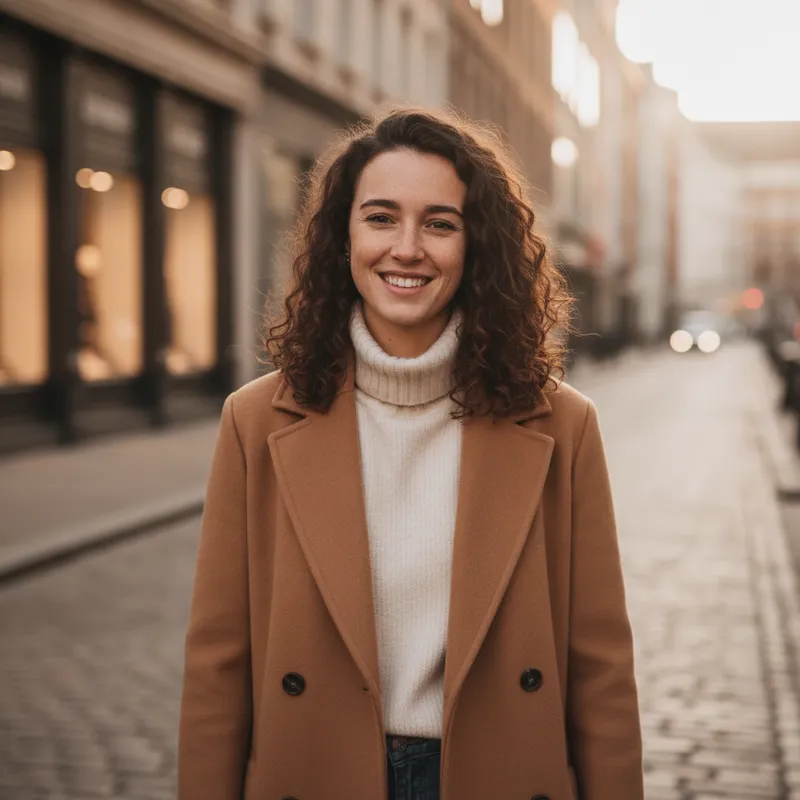
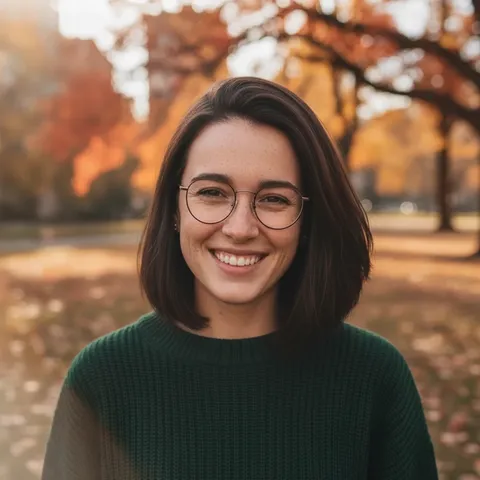
The third prompt asked for a long camel coat over a cream turtleneck on a golden-hour street. The picture looks like a real street-style photo, but the woman in it is similar-looking, not the same: fewer freckles, shorter and darker hair, a narrower face. We judged that by eye against the input, and one portrait is one test. It matches what we saw on our headshots page: when outfit and setting change together, the person can change too. If you need your own face, change one thing at a time.
- Outfit plus setting together: face drifted in our run
- Backdrop or light alone: face kept in our runs
- Always compare with your photo before you use it
Real people only as you, and no brand looks
Use photos of yourself or people who agreed. The editor refuses requests that name real people or celebrities, sexual or nude content, and minors, and our prompts name no label, designer or brand. A fashion shot of a real person who did not agree to it is not something this site is for, and asking for a famous model’s look is refused by the written-request check.
- Your own photo, or people who agreed
- No celebrity or real-person likeness
- No logos or brand names in the prompt
What we read, and what we could not confirm
OpenArt’s fashion model generator, as the page states it
- You can upload a garment photo (JPEG, PNG, WEBP or HEIC) as a reference and describe the model, pose and setting in plain words. Examples on the page: “petite model”, “plus-size model”, “tall male model”; backdrops such as a studio, city street, beach terrace or runway. The page says the garment’s colour, print and cut stay close to the original. It lets you choose an image model and aspect ratio (3:4 and 9:16 are the examples).Source: OpenArt, fashion model generator (vendor claim) ·
- To keep one model across a collection you create one with “AI Character” and reuse it. “Edit Image” changes background, print or colours afterwards. The page lists image models in its site menu (for example Nano Banana 2 and Seedream 5.5) but does not say which one this generator uses.Source: OpenArt, fashion model generator (vendor claim) ·
- Free to start: new accounts get 40 credits to try it, with no credit card required (the page’s own wording, paraphrased). Commercial use: images made on the Plus plan or higher may be used commercially, per OpenArt’s Terms. The page does not say whether free-plan images may be used commercially, does not state how many credits one image costs, and shows no page date.Source: OpenArt, fashion model generator (vendor claim) ·
OpenArt’s plan prices, as its pricing page states them
- Starter $14 a month for 4,000 credits; Plus $34 for 12,000; Pro $56 for 24,000; Wonder $240 for 106,000. Annual prices are shown per month at a discount (Starter $11, Plus $24, Pro $36, Wonder $144), but the page’s structured data shows different annual figures ($13, $27, $44, $175), so we do not know which is current. “Commercial use rights” are named for Plus, Pro and Wonder, not for Starter. An extra-credit add-on is $15 a month for 5,000 credits on Plus or higher. Promotions apply to the first billing period only.Source: OpenArt, pricing (vendor claim) ·
- Our arithmetic: on Starter monthly, $14 for 4,000 credits is $0.0035 a credit. The page does not say how many credits one fashion image uses, so we cannot give a price per image. For comparison, one image on this site is 10 credits, from $0.13 on a monthly plan.Source: This site, from OpenArt’s pricing page ·
Another tool for the part this site cannot do
- FASHN’s page describes creating a model from a text description or a library model, optional reference images, and output up to 4K; it says garments are handled by a separate virtual try-on page that “shows your real garments on generated models”, which we did not open. It says “Get started for free” and “No credit card required” but shows no prices or credit amounts. It says images may be used in advertising, product pages, catalogs, lookbooks and social campaigns, that reference images need permission, and that some campaigns must be labelled as AI-generated depending on location and platform.Source: FASHN (vendor claim) ·
Not confirmed
- How many credits one OpenArt fashion image costs, which model the fashion generator runs, whether free-plan images may be used commercially, and which annual price is current. The page and its structured data disagree.Source: OpenArt ·
- Whether OpenArt’s or FASHN’s garment tools keep a print and cut as well as they say. We did not run either, and this site cannot run a garment test at all.Source: OpenArt, FASHN ·
- FASHN’s prices and free limits, and its virtual try-on page.Source: FASHN ·
- Other tools that came up in a search for “fashion model generator” (Claid, CGTrader, Hypotenuse, Hautech, Photoroom, Pixa and others) were seen as search-result titles only; we opened none of them and say nothing about them. The search tool is not Google.Source: Web search ·
Compare
AI fashion model generator: OpenArt, FASHN and this site
| Tool | What it takes | Price and limits as stated |
|---|---|---|
| OpenArt | A text description, optionally a garment photo (JPEG, PNG, WEBP, HEIC) | 40 credits for new accounts; plans $14 to $240 a month; cost per image not stated; commercial use on Plus or higher |
| FASHN | A text description or library model, optional reference images; try-on on a separate page | Free start, no prices or credit amounts on the page |
| This site (one photo in) | One photo of you and a written request, about 37 seconds, 1024 × 1024; no text-only models, no garment try-on | Free with sign-up: 10 credits = 1 image; then 10 credits per image, from $0.13 on a monthly plan |
Step by step
How to make a fashion-style shot from your own photo here
Pick one clear photo of yourself
One face, good light, chest-up or half-body, nothing covering the face. People who agreed only.
Change the backdrop and light first
Paste the catalogue or terracotta prompt below, or write your own. Say what must stay (face, hair, sweater) and ask for no text, logos or watermarks.
Compare with your photo
It takes about 37 seconds and 10 credits. Look at the eyes, nose, freckles and hair. If it looks like someone else, do not use it.
Then try one more change
If the face held, ask for one new thing such as a colour or a coat. Changing outfit and street together changed the woman in our run.
Prompts
Fashion model style prompts for this site’s editor
All three prompts were run once on this site’s editor on 2026-11-19 with one fictional, AI-generated portrait, and the notes say what came back, good or not. They name no label, designer or brand and we have not tested them in other tools. Results vary with the photo. You can also type your own request in the editor at the top (up to 400 characters).
Catalogue backdrop (worked)
Backdrop edits for work photos: AI professional headshotsRun once on this site’s editor on 2026-11-19 with one fictional AI-generated portrait. Face, curly hair, smile and sweater stayed the same; only the backdrop and the light changed. It is the first image on this page.
Catalogue shot on a light-grey backdrop
Keep my face, curly hair and smile exactly the same. Restyle this as a clean catalogue fashion shot: keep my green sweater, replace the park with a plain light-grey seamless studio backdrop, and light me with soft, even beauty-dish studio light, chest-up framing. No text, logos or watermarks.
New coat and new street (changed the face)
More edits in the AI photo editorRun once on 2026-11-19. It looks like a street-style fashion photo, but the woman is similar-looking, not the same one: fewer freckles, shorter and darker hair, a narrower face. Changing the outfit and the setting together is where likeness slipped, so use this card as a warning, not a recipe.
Editorial: camel coat on a golden-hour street
Keep my face, curly hair and smile exactly the same. Restyle this as an editorial fashion photo: dress me in a long camel wool coat over a cream turtleneck, standing on a quiet city street at golden hour with soft warm backlight and a shallow depth of field, half-body framing. No text, logos or watermarks.
Magazine colour backdrop (worked)
Turn the same photo into an avatarRun once on 2026-11-19 with the same portrait. Face, hair and sweater stayed the same on a deep terracotta backdrop. We asked for a hard side light and got a soft shadow on the left, so the light is gentler than the words.
Magazine look: terracotta backdrop, side light
Keep my face and curly hair exactly the same. Make this a magazine-style fashion shoot against a deep terracotta studio backdrop with one hard side light and a long soft shadow, me in my own green sweater, a confident calm expression, chest-up framing. No text, logos or watermarks.
Pricing on this site
Credit packs or a monthly plan.
Credits come in one-time packs ($4.99 for 50 credits, $9.99 for 120 credits, $19.99 for 300 credits); each image costs 10 credits. Or pick a plan from $9.90 a month (500 credits), cancel anytime.
Refund policy- Basic · $9.90/month500 credits a month · about 50 images · $0.20 per image
- Pro · $19.90/month1500 credits a month · about 150 images · $0.13 per image
Billed every month and renews automatically. Cancel anytime in Settings; you keep the plan until the end of the month you paid for. Each month's credits are for that month; unused ones expire.
Refund policyPhoto tools on this site
Edits, restyles and effects for your own photo; one video tool


FAQ
Questions, answered
What is an AI fashion model generator?
A tool that makes fashion-style pictures of a model without a photoshoot. Most take a text description of the model and often a photo of a garment. OpenArt’s page describes exactly that. This site works differently: it edits one photo that you upload.
Can I make an AI fashion model from text here?
No. This site needs a photo to start from and does not make a person from words alone. The nearest thing it does is restyle a photo of yourself as a catalogue or editorial fashion shot.
Is there virtual try-on, to see my clothes on a model?
No. This site takes one photo only, so it cannot take a garment photo as well. FASHN’s page points to a separate virtual try-on page for real garments; we did not open it. You can change the outfit in your own photo with words, but expect the face to drift sometimes, as our camel-coat run did.
Is there a free AI fashion model generator here?
Partly: new accounts get 10 free credits after signing in, enough for 1 free image (once per account, valid for 7 days, while the day's new-account gifts last). Each image costs 10 credits and takes about 37 seconds; after that, from $0.13 per image on a monthly plan. OpenArt’s page says new accounts get 40 credits to try it with no card, but not how many images that is.
Can I use a model from my own photo for a clothing brand?
You can edit a photo of someone who agreed, but this site does not put your product on them, so it is not a product-photo tool. If you sell clothing, check the licence of any tool you use: OpenArt’s page says commercial use starts at its Plus plan. Some platforms and places also expect AI-made campaign images to be labelled. This is not legal advice.
Can I get a fashion model look from my own photo that keeps my face?
Often, if you change only the backdrop and the light. In our runs a grey catalogue backdrop and a terracotta backdrop kept the face. A new coat plus a new street together gave a similar-looking different woman. Compare the result with your photo before you use it.
Can I turn the edit into a catwalk video?
This site has a separate video tool: one photo becomes one silent 5-second 720p clip for 15 credits, paid credits only; the sign-up gift does not pay for it. It does not run a catwalk or move a garment. See the free AI video generator page for what it does.
Can I ask for a famous model or a brand’s look?
No for people: the editor refuses requests that name celebrities or real people. Our prompts also name no brand or label; describe the look in your own words, such as a plain backdrop and soft light.
Want a fashion-style shot of your own photo?
Upload one photo, write the change, and download the result in about 37 seconds.
Edit a photo hereIndependent site. Not affiliated with or endorsed by OpenArt or FASHN. Their names are used only to say what their pages state. This site does not create people from text or dress models in product photos. Facts about other sites come from their own pages, read on 2026-11-19 through a page-reading tool that summarises; prices, limits and availability may change. This is not legal advice.