How to make a Sheru Bhai video on your phone, and what to do when it fails
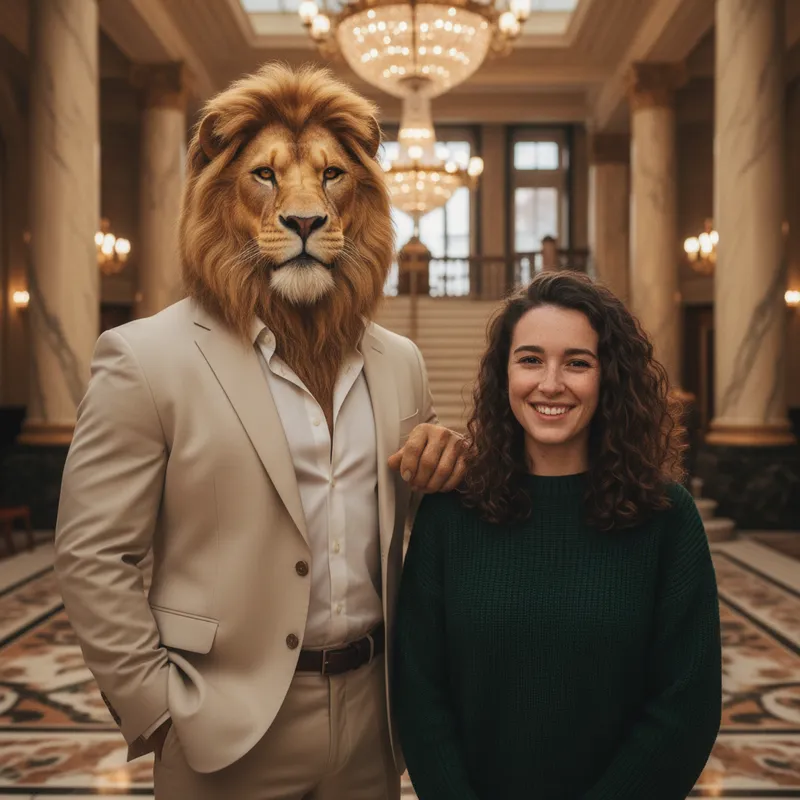
To make a Sheru Bhai video on your phone, make a start image of yourself with the lion, give it and a short scene prompt to Google Flow, which gives everyone 50 credits a day and free clips of up to 10 seconds, then join the clips in a video editor; the generator below makes the start image from one portrait in about 37 seconds. Free with sign-up: 10 credits = 1 image, then from $0.13 per image on a monthly plan.
 Your photo
Style
- Image only here, not video
- Google facts from its help pages
- Free with sign-up: 10 credits = 1 image
- free Google Flow credits
- 50 a day
- longest free clip in Flow
- 10 s
- free video may pause (7:30–10:30 PM India)
- 2–5 PM UTC
- for the start image here
- ≈ 37 s
On your phone
How to make the video on your phone, step by step
Install the Flow app (Android 12 or newer) or open Flow in a browser. Google asks for a verified age of 18 or older and a supported region.
Upload one portrait in the generator at the top of this page; in about 37 seconds you get a picture of you next to the lion. Save it to your phone.
In Flow choose Video, then Frames, add the start image, and paste one scene prompt from below. Keep each clip short; free clips go up to 10 seconds.
Download the clips and join them in CapCut or VN, as the guides do. Say the video is AI-made.
When it fails
It will not work on my phone: what to check
| What you see | Why it happens | What to do |
|---|---|---|
| The app will not install | The Flow app needs Android 12 or newer. We read only the Android page; iPhone is not checked. | Open Flow in a browser instead. |
| Flow will not let you in | Google requires a verified age of 18 or older and a supported region. | Check your account’s age and region. We found no workaround to recommend. |
| Video will not generate in the evening | Without a plan, video may be paused in peak hours, about 2–5 PM UTC, which is 7:30–10:30 PM in India. | Try outside that window. |
| You ran out of credits | 50 a day. A clip up to 10 seconds costs 1 credit a second at 360p or 3 at 720p, so one 10-second 720p clip is 30 credits (our arithmetic). Unused credits do not roll over. | Test at 360p, keep clips short, and come back the next day. |
| You cannot extend the clip | Extending a video is for paid plans. | Make separate scenes and join them in your editor. |
| The lion looks different in every clip | Not covered by Google’s help pages; we have not tested it. | Use the same character sheet image as an ingredient in every scene (Video, then Ingredients). |
Where these facts come from
Google Flow (Google help pages)
- Everyone gets 50 Flow credits a day, with or without a plan; unused credits do not roll over. Without a plan, video may not generate during peak hours (about 2–5 PM UTC), and extending a video is for paid plans.Source: Google Flow Help ·
- Flow has an Android app (Android 12+). You must be 18 or older with a verified age, in a supported region.Source: Google Flow Help ·
- Flow can animate an image: add a start frame (Video, then Frames) or reference images as ingredients (Video, then Ingredients).Source: Google Flow Help ·
What guides say
- One guide makes the clips in Flow (9:16, 10 seconds, 720p) and joins two clips in CapCut or VN. It says the route works with free credits and names no country limits.Source: Ye Technical ·
Not confirmed
- Whether the prompts here work well in Flow: we have not run them there. Whether the Flow web version works on every phone browser: not checked.Source: Google Flow Help ·
- The main page: upload one portrait and get the lion photo, plus prompts and the four most-asked questions.Source: Sheru Bhai AI photo: pose with an AI lion ·
- What it is, the formats, what is and is not known about where it started, and how to join.Source: What is the Sheru Bhai trend? ·
- The same steps in Hindi.Source: शेरू भाई AI फोटो कैसे बनाएं (Hindi guide) ·
- Copy-ready video prompts and the free Google Flow route.Source: Sheru Bhai AI video prompt ·
Prompts
Sheru Bhai video prompts for Google Flow
Our own prompts. They describe a generic lion-headed character, not the original trend character, and the Hindi lines are ours. Not tested in Flow or other tools, so results may differ.
Character sheet (make it first)
Use the image as an ingredient in each scene.
Character sheet (image)
Character reference sheet on a plain light-grey background: a tall lion-headed man with a muscular human body, a realistic lion head with a thick golden mane and amber eyes, a tailored cream three-piece suit, a gold watch and dark sunglasses. Full body, shown from the front, three-quarter and side, standing upright, the same outfit in every view. Even studio light, photorealistic fur and fabric. No text, labels, logos or watermarks.
Scenes
One clip per scene.
Scene 1: the rival bids
Vertical 9:16 cinematic clip, about 8 seconds. A marble auction hall with chandeliers. A rival bidder in a navy suit stands up and shouts in Hindi: "Ek crore!" The crowd murmurs. Cut to a tall lion-headed man with a muscular human body, a realistic lion head with a thick golden mane and amber eyes, a tailored cream three-piece suit, a gold watch and dark sunglasses, sitting calmly in the front row, slowly lowering his sunglasses. Warm light, slow push-in on the lion. Keep his look exactly the same throughout. No subtitles, text, logos or watermarks.
Scene 2: the lion wins
Vertical 9:16 cinematic clip, about 8 seconds. Same marble auction hall. a tall lion-headed man with a muscular human body, a realistic lion head with a thick golden mane and amber eyes, a tailored cream three-piece suit, a gold watch and dark sunglasses raises his bidding paddle without standing up and says in a deep, calm voice in Hindi: "Das crore." The room gasps, the rival sits down defeated, and the auctioneer bangs the gavel. Low-angle shot of the lion, warm light. Keep his look exactly the same throughout. No subtitles, text, logos or watermarks.
Scene 3: the punchline
Vertical 9:16 cinematic clip, about 8 seconds. An assistant carries the prize to a tall lion-headed man with a muscular human body, a realistic lion head with a thick golden mane and amber eyes, a tailored cream three-piece suit, a gold watch and dark sunglasses: a velvet box that opens to show one small yellow rubber duck. The lion holds it up proudly, smiles and says in Hindi: "Mere bathtub ke liye." The rival in the navy suit face-palms in the background. Bright, comic timing, realistic look. Keep his look exactly the same throughout. No subtitles, text, logos or watermarks.
Pricing on this site
Credit packs or a monthly plan.
Only the start image is made here. Credits come in one-time packs ($4.99 for 50 credits, $9.99 for 120 credits, $19.99 for 300 credits); each image costs 10 credits. Or pick a plan from $9.90 a month (500 credits), cancel anytime.
Refund policy- Basic · $9.90/month500 credits a month · about 50 images · $0.20 per image
- Pro · $19.90/month1500 credits a month · about 150 images · $0.13 per image
Billed every month and renews automatically. Cancel anytime in Settings; you keep the plan until the end of the month you paid for. Each month's credits are for that month; unused ones expire.
Refund policyMore photo effects
Edits and effects for your own photo
FAQ
Questions, answered
How do I make a Sheru Bhai video on my phone?
Make a start image of you with the lion, open Google Flow (Android app or browser), choose Video then Frames, add the image and a scene prompt, and join the clips in CapCut or VN.
Is it free?
Google Flow gives everyone 50 credits a day, and free clips go up to 10 seconds; extending a clip needs a paid plan. The start image here is free for one image after sign-in.
Why does it not work on my phone?
Common reasons from Google’s help pages: Android older than 12, an account without a verified age of 18+, an unsupported region, the free-video pause at about 2–5 PM UTC (7:30–10:30 PM in India), or no credits left today. See the table above.
How long can a clip be?
Up to 10 seconds without a paid plan. Make separate scenes and join them in a video editor.
Can I put myself in the video?
You can start from a picture of yourself with the lion, made here, and use it as the start frame. Only use your own photo or photos of people who agreed.
Does this site make the video?
No. This site makes one image per run, in about 37 seconds, and is not affiliated with Google or the creator of the trend. Partly: new accounts get 10 free credits after signing in, enough for 1 free image (once per account, valid for 7 days, while the day's new-account gifts last).
Start with the picture.
Upload a portrait, generate, and download the start image in about 37 seconds.
Make my start imageIndependent site. Not affiliated with Google, the creator of the Sheru Bhai character or any AI model provider. Google facts come from its help pages, read on 2026-11-16; limits may have changed. We have not tested the prompts in Google Flow.